Loading...
Searching...
No Matches
Face Directory Reference
Directory dependency graph for Face:
Directories | |
| FaceAttributes | |
Files | |
| Face.h | |
| FaceCapture.h | |
| FaceCrop.h | |
| FaceCropConfiguration.h | |
| FaceDetector.h | |
| FaceExecutor.h | |
| FaceValidation.h | |
| OFIQFace.h | |
Detailed Description
The library can be used to detect faces from face captures.
Overview
The library can be used to detect faces from face captures. Face capture can contains one or group of people, faces or full body.
Face Detection
SDK can detect faces of various sizes, orientations, facial hair types or ethnicities. Face can be partly occluded by glasses, sunglasses or hat. SDK can operate with many different lighting conditions and image qualities. Face size is defined as a maximum of values of inter eyes centers distance and distance between center of mouth and center point between eyes: face_size = max(distance(left_eye_center, right_eye_center), distance(mouth_center,eyes_center))
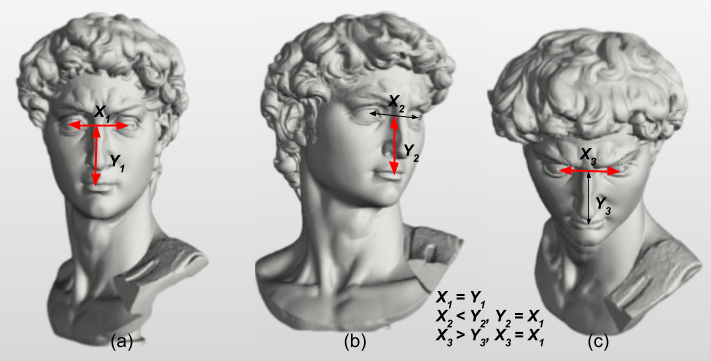
Face Size
Image above shows face size visualizations of various distances of inter eyes centers distances (X=distance(left_eye_center,right_eye_center)) and distances between center of mouth and center point between eyes (Y=distance(mouth_center, eyes_center)). The face size is the maximum of these two distances. It can be seen from images (a), (b) and (c) that the face size (red arrow) defined in this way is invariant to pose of the head (yaw, pitch, roll). The face size can be specified in absolute (pixel distance) or relative value (pixel distance) relative to image size (max(image_height, image_width)) and is important parameter for face detection. SDK can detect faces of various size but there is a lower limit of face size. Upper limit on the face size is not defined. The recommended face size is more than 50 pixels. SDK face processing or recognition functions have the most accurate results when this recommendation is fulfilled. Face area is closely related to the face size. It is an area around a face defined by a bounding rectangle with width = 4 x face_size, height = width / 0.75 (according to ISO/IEC 19794-5 standard, section 9.2). The Point which is the geometric center between eyes is positioned in the face area in position X_Pos, Y_Pos, where Y_Pos = 0.6f x width, and X_Pos relies on the head yaw rotation. The main reason for this is to have the whole head in the face area no matter what the head rotation is.
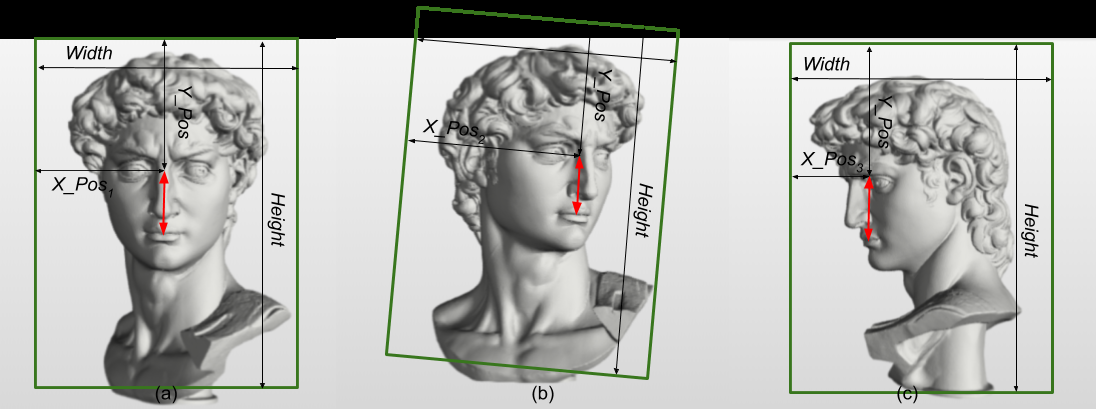
Face Area
Image above shows face area visualizations of face areas (green boxes) for face in various positions. The face size is defined by distance shown as the red arrow. There are shown different positions of face area according to the face yaw rotation in (a),(b) and (c). Positions of the eyes centers in the face areas are the same in the Y direction (Y_Pos) but changes in the X direction (X_Pos1, X_Pos2, X_Pos3). Width and Height is the same in all three cases. The face area size relative to image area size can specify sizes of faces that should be detected.
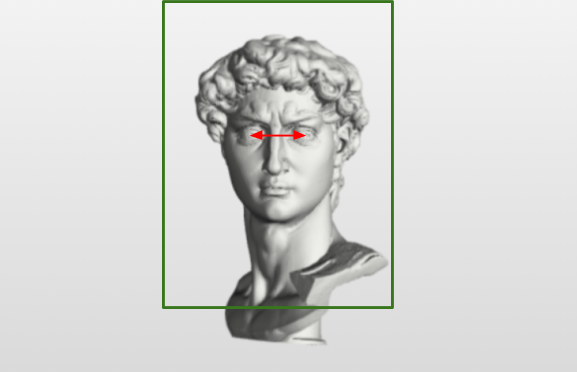
Face
If image above has resolution of 730x470 pixels (image_area_size = 730 x 470 = 343100) and face_size is 70 pixels (face_area_width = 70 x 4 = 280, face_area_height = face_area_width / 0.75 = 373, face_area_size = 104440), then relative image size is relative_image_size = 104440 / 343100 = 0.304 (30.4%). Face area is marked with green box and face size with red arrow. Sometimes, when faces are close to image boundaries, their face areas can get out of the image boundaries. Some application may want to find these faces (and filter them out). Due to this reason each face has attribute related to face area visible in image (FaceRelativeAreaInImage).
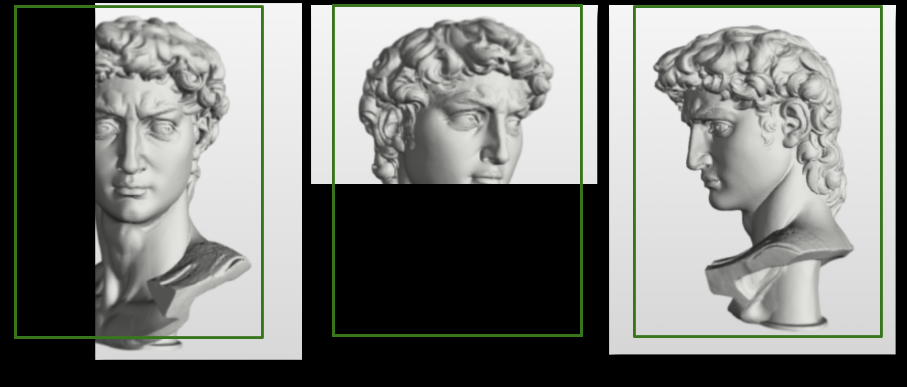
Face area visible in image.
In the image above relative values are (a) 0.30, (b) 0.5, (c) 1
SDK can detect faces of various rotations. However various face detection modes imply different ranges of detectable faces
| fast | accurate / balanced / accurate server | |
|---|---|---|
| Roll | <-15, 15 > | <-45, 45> |
| Yaw | <-30, 30 > | <-90, 90> |
| Pitch | <-30, 30 > | <-45, 45> |
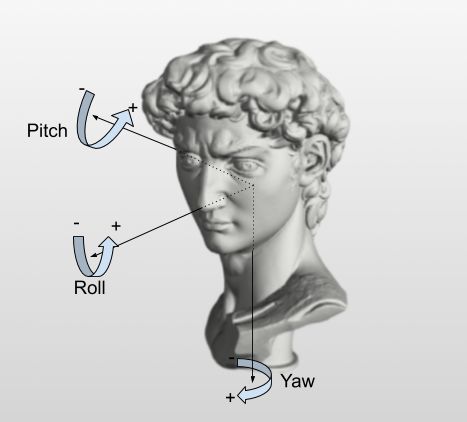
Possible face rotations (defined as in DIN9300)
Prior to further processing each face in FaceCapture MUST be detected via FaceDetector. SDK provides following detection modes:
- accurate
Neural network face detector and facial features detector with very high accuracy.
It is slower than
balancedmode.- Required Solvers
Total size of solvers is 27 MB.
References face-detector-accurate.solver, face-detector-landmarks-mob-0.50.solver, face-detector-eye-validation.solver
- balanced
Neural network face detector and facial features detector with good accuracy.
It is slower than
fastmode.- Required Solvers
Total size of solvers is 14 MB.
References face-detector-accurate.solver, face-detector-landmarks-mob-0.25.solver, face-detector-eye-validation.solver
- fast
The fastest face detector in combination with the fastest face validators and facial features detectors are used when fast mode is used.
Some faces that are partially occluded faces or faces with sunglasses may be missed. However the speed performance of the face detection is much better as when other modes are used.
- Required Solvers
Total size of solvers is 559 kB.
References face-detector-fast.solver, face-detector-eye-validation.solver, face-detector-landmarks-fast.solver
- accurate_server
- Note
- Not supported in this variant of Enrollment SDK.
Using of different modes can adjust trade-off between speed and accuracy of face detection. Face detection accuracy has two meaning:
- ratio between false accepted faces and false rejected faces.
- precision of facial keypoints detection.
Face Detection
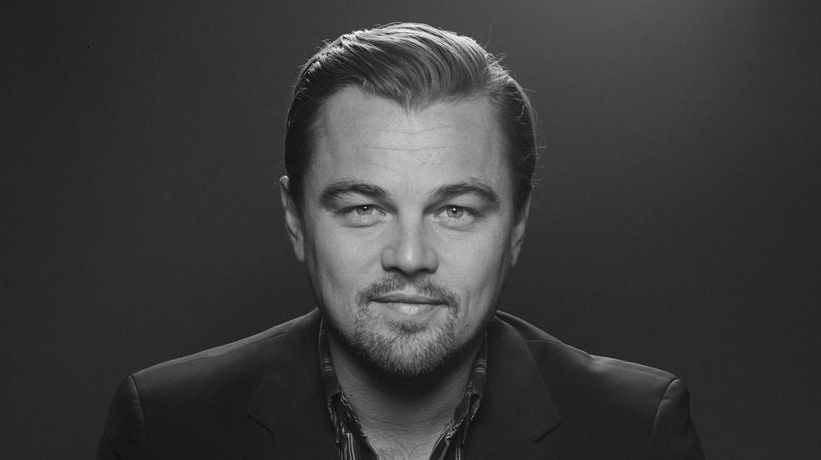
Face
-
c++auto fc = FaceCapture::Create(std::move(img));auto cfg = FaceDetector::Config{};cfg.SetMaxDetectionSize(0.9F);FaceDetector fd(cfg);auto face = fc->DetectWith(fd)[0];auto cropCfg = FaceCropConfiguration();cropCfg.SetCropMethod(FaceCrop::TOKEN);auto croppedFace = face->Crop(cropCfg);if (not croppedFace->IsCropRegionInsideImage()){// shrink bounding box into imagecropCfg.SetCropScale(0.90F);auto resizedCrop = face->Crop(cropCfg);auto resizedCropRegion =fc->Draw(resizedCrop->GetCropRectangle(), Shapes::InnoBlue);resizedCropRegion->SaveAs("output/face_crop_box_resized.png");}
-
java Image img = Image.Decode(BinaryFile.ReadAll("assets/face.png"));FaceCapture capture = new FaceCapture(img);FaceDetector.Config cfg = FaceDetector.Config.Default();cfg.SetMaxDetectionSize(0.9F);FaceDetector detector = new FaceDetector(cfg);Face face = capture.DetectWith(detector).get(0);FaceCropConfiguration cropCfg = new FaceCropConfiguration();cropCfg.SetCropMethod(FaceCrop.TOKEN);CroppedFace croppedFace = face.Crop(cropCfg);// shrink bounding box into imagecropCfg.SetCropScale(0.90f);CroppedFace resizedCrop = face.Crop(cropCfg);Image resizedCropRegion = capture.Draw(resizedCrop.GetCropRectangle(), Shapes.InnoBlue);resizedCropRegion.SaveAs("output/face_crop_box_resized.png");}
-
csharp Image img = Image.Decode(BinaryFile.ReadAll("assets/face.png"));FaceCapture capture = new FaceCapture(img);FaceDetector detector = new FaceDetector();Face face = capture.DetectWith(detector)[0];FaceCropConfiguration cropCfg = new FaceCropConfiguration();cropCfg.SetCropMethod(FaceCrop.TOKEN);CroppedFace croppedFace = face.Crop(cropCfg);{// shrink bounding box into imagecropCfg.SetCropScale(0.90f);CroppedFace resizedCrop = face.Crop(cropCfg);Image resizedCropRegion =capture.Draw(resizedCrop.GetCropRectangle(), Shapes.InnoBlue);resizedCropRegion.SaveAs("output/face_crop_box_resized.png");}
The output of example
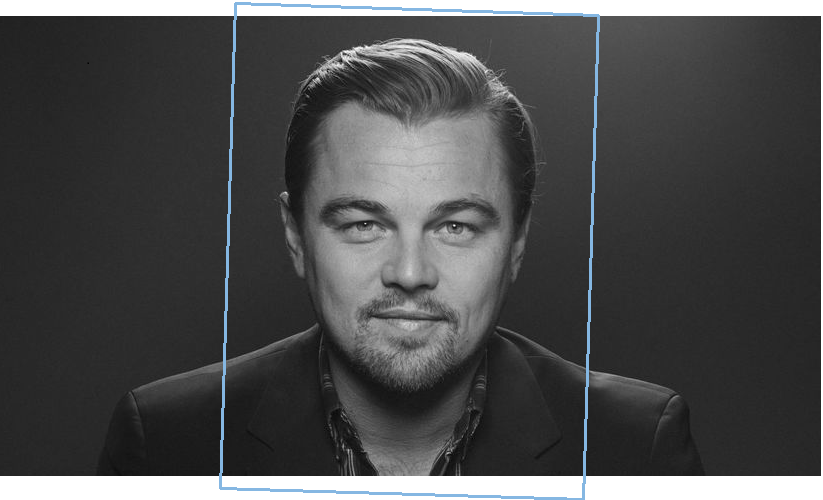
Face with crop region outside of image
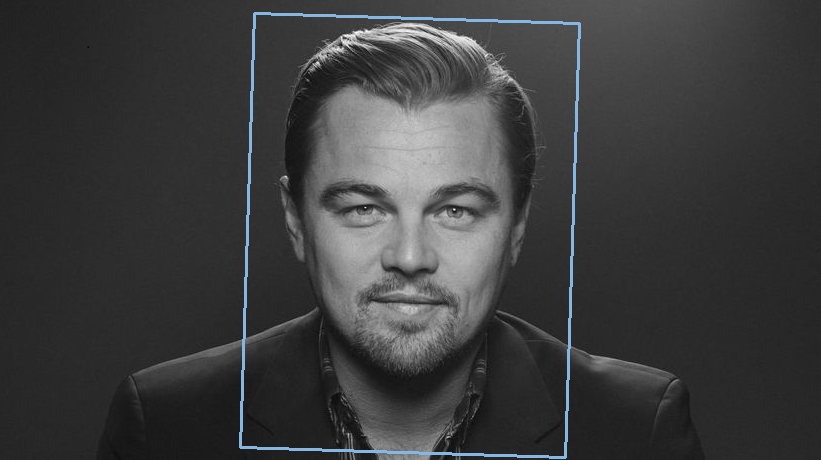
Face with shrunken crop
Face Detection with various crops
Once a face is detected, a Face object is provided. It is possible to set various crop methods via Face::Crop() method.
-
c++auto fc = FaceCapture::Create(std::move(img));auto cfg = FaceDetector::Config{};cfg.SetMaxDetectionSize(0.9F);FaceDetector fd(cfg);auto face = fc->DetectWith(fd)[0];FaceCropConfiguration cropCfg;cropCfg.SetCropBackground(Colors::InnoBlue);cropCfg.SetCropMethod(FaceCrop::FULL);auto full = face->Crop(cropCfg)->GetFaceCapture();cropCfg.SetCropMethod(FaceCrop::FULL_NOT_ALIGNED);auto fullNotAligned = face->Crop(cropCfg)->GetFaceCapture();cropCfg.SetCropMethod(FaceCrop::TOKEN);auto token = face->Crop(cropCfg)->GetFaceCapture();cropCfg.SetCropMethod(FaceCrop::TOKEN_NOT_FRONTAL);auto tokenNotFrontal = face->Crop(cropCfg)->GetFaceCapture();
-
java Image img = Image.Decode(BinaryFile.ReadAll("assets/face.png"));FaceCapture capture = new FaceCapture(img);FaceDetector detector = new FaceDetector();Face face = capture.DetectWith(detector).get(0);FaceCropConfiguration cropCfg = new FaceCropConfiguration();cropCfg.SetCropBackground(Colors.InnoBlue);cropCfg.SetCropMethod(FaceCrop.FULL);FaceCapture full = face.Crop(cropCfg).GetFaceCapture();cropCfg.SetCropMethod(FaceCrop.FULL_NOT_ALIGNED);FaceCapture fullNotAligned = face.Crop(cropCfg).GetFaceCapture();cropCfg.SetCropMethod(FaceCrop.TOKEN);FaceCapture token = face.Crop(cropCfg).GetFaceCapture();cropCfg.SetCropMethod(FaceCrop.TOKEN_NOT_FRONTAL);FaceCapture tokenNotFrontal = face.Crop(cropCfg).GetFaceCapture();
-
csharp var img = Image.Decode(BinaryFile.ReadAll("assets/face.png"));var capture = new FaceCapture(img);var detector = new FaceDetector();var face = capture.DetectWith(detector)[0];var cropCfg = new FaceCropConfiguration();cropCfg.SetCropBackground(Colors.InnoBlue);cropCfg.SetCropMethod(FaceCrop.FULL);var full = face.Crop(cropCfg).GetFaceCapture();cropCfg.SetCropMethod(FaceCrop.FULL_NOT_ALIGNED);var fullNotAligned = face.Crop(cropCfg).GetFaceCapture();cropCfg.SetCropMethod(FaceCrop.TOKEN);var token = face.Crop(cropCfg).GetFaceCapture();cropCfg.SetCropMethod(FaceCrop.TOKEN_NOT_FRONTAL);var tokenNotFrontal = face.Crop(cropCfg).GetFaceCapture();
The output of example
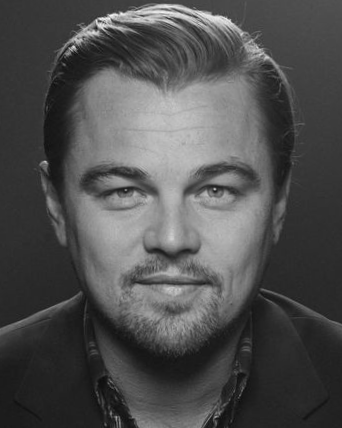
Face with FULL crop configuration
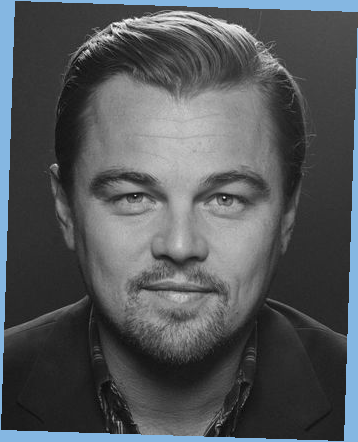
Face with FULL_NOT_ALIGNED crop
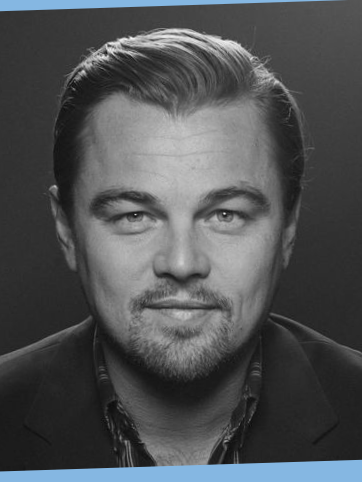
Face with TOKEN crop
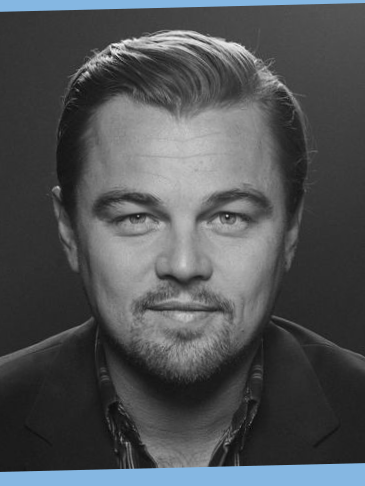
Face with TOKEN_NOT_FRONTAL crop
Faces Detection
It is possible to detect multiple faces (up to 16) in FaceCapture.
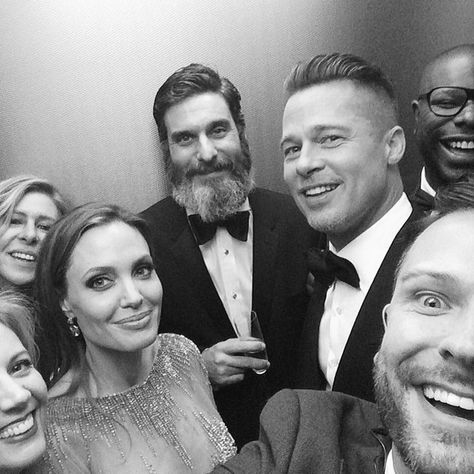
Faces
The faces are detected with function FaceCapture::DetectWith.
-
c++auto fc = FaceCapture::Create(std::move(img));FaceDetector fd;auto faces = fc->DetectWith(fd);unsigned int index = 0;for (const auto& face : faces){const std::string name = "output/face_" + std::to_string(index++) + ".png";face->Crop({})->GetFaceCapture()->image->SaveAs(name);}auto boundingBoxes = fc->Draw(faces, Shapes::InnoBlue);boundingBoxes->SaveAs("output/faces_bounding_boxes.png");
-
java Image img = Image.Decode(BinaryFile.ReadAll("assets/faces.png"));FaceCapture capture = new FaceCapture(img);FaceDetector detector = new FaceDetector();Faces faces = capture.DetectWith(detector);int index = 0;for (Face face : faces) {face.Crop(new FaceCropConfiguration()).GetFaceCapture().getImage().SaveAs("output/face_" + index + ".png");index++;}Image boundingBoxes = capture.Draw(faces, Shapes.InnoBlue);boundingBoxes.SaveAs("output/faces_bounding_boxes.png");
-
csharp Image img = Image.Decode(BinaryFile.ReadAll("assets/faces.png"));FaceCapture capture = new FaceCapture(img);FaceDetector detector = new FaceDetector();Faces faces = capture.DetectWith(detector);int index = 0;foreach (Face face in faces){face.Crop(new FaceCropConfiguration()).GetFaceCapture().image.SaveAs("output/face_" + index + ".png");index++;}Image boundingBoxes = capture.Draw(faces, Shapes.InnoBlue);boundingBoxes.SaveAs("output/faces_bounding_boxes.png");
The output of example are detected faces
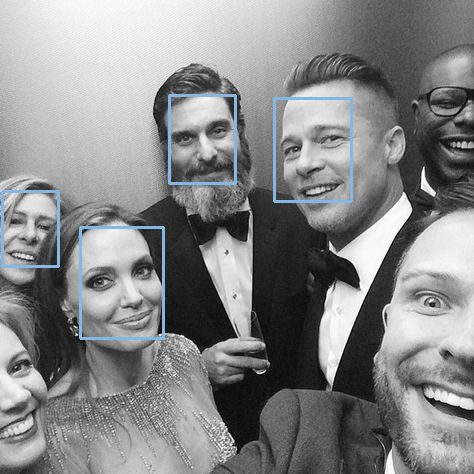
Detect Faces
and unique faces

Detected face 1
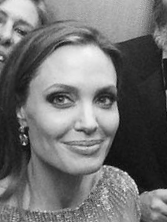
Detected face 2
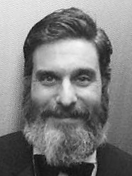
Detected face 3
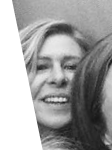
Detected face 4
Extraction
We provide Internal Innovatrics template for Face. The main goal is to create template for further processing e.g. 1:1 Verification.
-
c++auto fc = FaceCapture::Create(std::move(img));FaceDetector fd;// Detect faceauto face = fc->DetectWith(fd)[0];auto cfg = FaceExtractorConfig::Default();auto faceTemplate = face->Extract(cfg);BinaryFile::WriteAll("output/face.ics", faceTemplate->data);std::cout << " Template Version: " << faceTemplate->GetVersion() << std::endl;
-
java Image img = Image.Decode(BinaryFile.ReadAll("assets/face.png"));FaceCapture fc = new FaceCapture(img);FaceDetector fd = new FaceDetector();Face face = fc.DetectWith(fd).get(0);FaceExtractorConfig cfg = FaceExtractorConfig.Default();ExtractedFace faceTemplate = face.Extract(cfg);BinaryFile.WriteAll("output/face.ics", faceTemplate.getData());System.out.println(" Template Version: " + faceTemplate.GetVersion());
-
csharp Image img = Image.Decode(BinaryFile.ReadAll("assets/face.png"));FaceCapture fc = new FaceCapture(img);FaceDetector fd = new FaceDetector();Face face = fc.DetectWith(fd)[0];FaceExtractorConfig cfg = FaceExtractorConfig.Default();ExtractedFace faceTemplate = face.Extract(cfg);BinaryFile.WriteAll("output/face.ics", faceTemplate.data);System.Console.WriteLine(" Template Version: " + faceTemplate.GetVersion());
1 to 1 Verification
We provide verification of face templates. The main goal is to calculate Similarity Score for given probe and gallery templates. The examples uses same image for probe and gallery
Face
-
c++auto fc = FaceCapture::Create(std::move(img));FaceDetector fd;auto face = fc->DetectWith(fd)[0];auto probe = face->Extract();auto gallery = face->Extract();auto score = probe->SimilarWith(*gallery);std::cout << " Match Score: " << score << std::endl;
-
java Image img = Image.Decode(BinaryFile.ReadAll("assets/face.png"));FaceCapture fc = new FaceCapture(img);FaceDetector fd = new FaceDetector();Face face = fc.DetectWith(fd).get(0);ExtractedFace probe = face.Extract();ExtractedFace gallery = face.Extract();long score = probe.SimilarWith(gallery);System.out.println(" Match Score: " + score);
-
csharp Image img = Image.Decode(BinaryFile.ReadAll("assets/face.png"));FaceCapture fc = new FaceCapture(img);FaceDetector fd = new FaceDetector();Face face = fc.DetectWith(fd)[0];ExtractedFace probe = face.Extract();ExtractedFace gallery = face.Extract();uint score = probe.SimilarWith(gallery);System.Console.WriteLine(" Match Score: " + score);
Face Segmentation
It is possible to distinguish face and background once face is detected.
-
c++auto fc = FaceCapture::Create(std::move(img));const FaceDetector::Config cfg;FaceDetector fd(cfg);auto face = fc->DetectWith(fd)[0];auto cropCfg = FaceCropConfiguration();cropCfg.SetCropMethod(FaceCrop::FULL);auto croppedFace = face->Crop(cropCfg);auto maskImage = croppedFace->FaceAreaMask();auto faceSegmentColor = croppedFace->FaceAreaSegment(Colors::InnoBlue.color);auto faceSegmentTransparent = croppedFace->FaceAreaSegment();maskImage->SaveAs("output/face_seg_mask.png");faceSegmentColor->SaveAs("output/face_seg_color.png");faceSegmentTransparent->SaveAs("output/face_seg_transparent.png");
-
java Image img = Image.Decode(BinaryFile.ReadAll("assets/face.png"));FaceCapture capture = new FaceCapture(img);FaceDetector detector = new FaceDetector();Face face = capture.DetectWith(detector).get(0);FaceCropConfiguration cropCfg = new FaceCropConfiguration();cropCfg.SetCropMethod(FaceCrop.FULL);CroppedFace croppedFace = face.Crop(cropCfg);Image maskImage = croppedFace.FaceAreaMask();Image faceSegmentColor = croppedFace.FaceAreaSegment(Colors.InnoBlue.getColor());Image faceSegmentTransparent = croppedFace.FaceAreaSegment();maskImage.SaveAs("output/face_seg_mask.png");faceSegmentColor.SaveAs("output/face_seg_color.png");faceSegmentTransparent.SaveAs("output/face_seg_transparent.png");
-
csharp Image img = Image.Decode(BinaryFile.ReadAll("assets/face.png"));FaceCapture capture = new FaceCapture(img);FaceDetector detector = new FaceDetector();Face face = capture.DetectWith(detector)[0];FaceCropConfiguration cropCfg = new FaceCropConfiguration();cropCfg.SetCropMethod(FaceCrop.FULL);CroppedFace croppedFace = face.Crop(cropCfg);Image maskImage = croppedFace.FaceAreaMask();Image faceSegmentColor = croppedFace.FaceAreaSegment(Colors.InnoBlue.color);Image faceSegmentTransparent = croppedFace.FaceAreaSegment();maskImage.SaveAs("output/face_seg_mask.png");faceSegmentColor.SaveAs("output/face_seg_color.png");faceSegmentTransparent.SaveAs("output/face_seg_transparent.png");
The output of example

Face with colored background

Masked Face
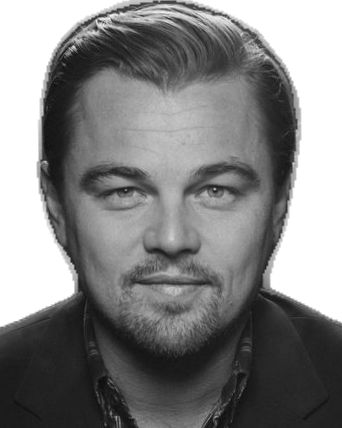
Face with transparent background
Face Attributes
ICAO and face image quality
The International Civil Aviation Organization (ICAO) defines global requirements for facial images used in machine-readable travel documents (MRTDs) in ICAO Doc 9303. These requirements describe how a compliant face image must be captured and presented: frontal pose, neutral expression, proper illumination, uniform background, correct head size and positioning. Compliant images ensure easy use for ID document personalization and good performance in both human verification and computer automated facial recognition.
These ICAO requirements are technically implemented and formalized in:
- ISO/IEC 39794-5 — Face image data format and capture requirements
- ISO/IEC 19794-5 — Legacy face image specifications
- ISO/IEC 29794-5 — Face image quality assessment
ISO/IEC 19794-5 defines four face image types: Basic (record format only), Frontal (with Full Frontal and Token Frontal subtypes), and specifies scene requirements (pose, expression, lighting, background, etc.), photographic requirements (exposure, focus, face position, head size), digital requirements (color profile, resolution, geometry), and format requirements (encoding, compression).
ISO/IEC 29794-5 defines a canonical face image as a face image conformant to an external standard or specification of a reference face image in most civil identity and travel document applications this corresponds to the ISO/IEC 39794-5 portrait specification, which reflects ICAO Doc 9303. [8]
Implementations and rationale
Enrollment provides two implementations for assessing face image quality against ICAO/ISO requirements:
- Innovatrics — proprietary implementation that checks mandatory and best-practice requirements of ICAO Doc 9303 and ISO/IEC 19794-5 for the full frontal face image type, with a rich set of individual attributes.
- OFIQ (Open Face Image Quality) — Implementation recognized by ISO/IEC 29794-5 as the reference for computing face image quality it outputs a unified quality score and standardized quality components.
When compliance with the standard or interchange with other systems is required, prefer OFIQ, as it is officially recognized by ISO/IEC 29794-5. The Innovatrics implementation is well-suited when fine-grained control over individual attributes or integration with other SDK features is needed.
Innovatrics implementation
The SDK (Innovatrics propietary implementation) is able to check all mandatory requirements and best practice recommendations of the ICAO Document 9303 specification and the ISO/IEC 19794-5 standard for the interoperable full frontal face image type, and of other relevant international standards (e.g. ANSI/INCITS 385-2004).
Once face is detected and Face object is provided, it is possible to get Face attributes.
- Sharpness - Sharpness attribute used to measure the sharpness level of an area of the detected face in the original face capture. See Face::Sharpness for more details.
- Brightness - Brightness attribute used to measure the brightness level of an area of the detected face in the original face capture. See Face::Brightness for more details.
- Contrast - Contrast attribute used to measure the contrast level of an area of the detected face in the original face capture. See Face::Contrast for more details.
- Unique Intensity Levels - Unique Intensity Levels attribute used to measure whether an area of the detected face in the original face capture has an appropriate number of unique intensity levels. See Face::UniqueIntensityLevels for more details.
- Shadow - Shadow attribute used to evaluate whether an area of the detected face in the original face capture is affected by shadows. See Face::Shadow for more details.
- Nose Shadow - Nose Shadow attribute for evaluating whether eyes or a nose don't cast sharp shadows. See Face::NoseShadow for more details.
- Specularity - Specularity attribute used to evaluate the presence of spotlights in an area of the detected face in the original face capture. See Face::Specularity for more details.
- Right Red Eye - Attribute for evaluating whether red-eye effect is not present on right eye. See Face::RightRedEye for more details.
- Left Red Eye - Attribute for evaluating whether red-eye effect is not present on left eye. See Face::LeftRedEye for more details.
- Eye Distance - Attribute used to measure the distance between the eyes in pixels for the detected face in the original face capture. See Face::EyeDistance for more details.
- Roll Angle - Attribute representing the head rotation angle around the Z-axis of the detected face in the original face capture, relative to the camera reference frame, as per DIN 9300. See Face::RollAngle for more details.
- Pitch Angle - Attribute representing the head rotation angle around the X-axis of the detected face in the original face capture, relative to the camera reference frame, as per DIN 9300. See Face::PitchAngle for more details.
- Yaw Angle - Attribute representing the head rotation angle around the Y-axis of the detected face in the original face capture, relative to the camera reference frame, as per DIN 9300. See Face::YawAngle for more details.
- Face Size - Attribute representing face size - the maximum of eye distance and eye-mouth distance. See Face::FaceSize for more details.
- Face Relative Area - Attribute representing the area of the detected face in the original face capture relative to the size of the original face capture. See Face::FaceRelativeArea for more details.
- Face Relative Area In Image - Attribute representing the visible area of the detected face in the original face capture relative to the total face area. See Face::FaceRelativeAreaInImage for more details.
- Width To Height Ratio Of Image - Attribute representing width to height aspect ratio of the original face capture. See Face::WidthHeightRatio for more details.
- Tinted Glasses - Attribute for evaluating tinted glasses presence. See Face::TintedGlasses for more details.
- Gender - Attribute for evaluating gender of subject. See Face::Gender for more details.
- Eye Gaze - Eye Gaze attribute used to evaluate whether the gaze direction of the detected face in the original face capture is frontal. See Face::EyeGaze for more details.
- Right Eye Status - Attribute for evaluating right eye status. See Face::RightEyeStatus for more details.
- Left Eye Status - Attribute for evaluating left eye status. See Face::LeftEyeStatus for more details.
- Glass Status - Attribute for evaluating glasses presence. See Face::GlassStatus for more details.
- Heavy Frame - Attribute for evaluating whether glasses with heavy frames are not present. See Face::HeavyFrame for more details.
- Mouth Status - Attribute for evaluating mouth status. See Face::MouthStatus for more details.
- Background Uniformity - Attribute used to measure background uniformity in the close area around the detected face in the original face capture. See Face::BackgroundUniformity for more details.
- Age - Attribute for evaluating age of subject using the face. See Face::Age for more details.
-
c++std::cout << " Sharpness: " << face->Sharpness() << std::endl;std::cout << " Brightness: " << face->Brightness() << std::endl;std::cout << " Contrast: " << face->Contrast() << std::endl;std::cout << " Unique Intensity Levels: " << face->UniqueIntensityLevels()<< std::endl;std::cout << " Shadow: " << face->Shadow() << std::endl;std::cout << " Nose Shadow: " << face->NoseShadow() << std::endl;std::cout << " Specularity: " << face->Specularity() << std::endl;std::cout << " Right Red Eye: " << face->RightRedEye() << std::endl;std::cout << " Left Red Eye: " << face->LeftRedEye() << std::endl;std::cout << " Eye Distance: " << face->EyeDistance() << std::endl;std::cout << " Roll Angle: " << face->RollAngle() << std::endl;std::cout << " Pitch Angle: " << face->PitchAngle() << std::endl;std::cout << " Yaw Angle: " << face->YawAngle() << std::endl;std::cout << " Face Size: " << face->FaceSize() << std::endl;std::cout << " Face Relative Area: " << face->FaceRelativeArea() << std::endl;std::cout << " Face Relative Area In Image: " << face->FaceRelativeAreaInImage()<< std::endl;std::cout << " Eye Gaze: " << face->EyeGaze() << std::endl;std::cout << " Right Eye Status: " << face->RightEyeStatus() << std::endl;std::cout << " Left Eye Status: " << face->LeftEyeStatus() << std::endl;std::cout << " Glass Status: " << face->GlassStatus() << std::endl;std::cout << " Heavy Frame: " << face->HeavyFrame() << std::endl;std::cout << " Mouth Status: " << face->MouthStatus() << std::endl;std::cout << " Background Uniformity: " << face->BackgroundUniformity(5)<< std::endl;std::cout << " Age: " << face->Age() << std::endl;std::cout << " Gender: " << face->Gender() << std::endl;std::cout << " Tinted Glasses: " << face->TintedGlasses() << std::endl;
-
java Face face = faces.get(0);System.out.println(" Sharpness: " + face.Sharpness());System.out.println(" Brightness: " + face.Brightness());System.out.println(" Contrast: " + face.Contrast());System.out.println(" Unique Intensity Levels: " + face.UniqueIntensityLevels());System.out.println(" Shadow: " + face.Shadow());System.out.println(" Nose Shadow: " + face.NoseShadow());System.out.println(" Specularity: " + face.Specularity());System.out.println(" Right Red Eye: " + face.RightRedEye());System.out.println(" Left Red Eye: " + face.LeftRedEye());System.out.println(" Eye Distance: " + face.EyeDistance());System.out.println(" Roll Angle: " + face.RollAngle());System.out.println(" Pitch Angle: " + face.PitchAngle());System.out.println(" Yaw Angle: " + face.YawAngle());System.out.println(" Face Size: " + face.FaceSize());System.out.println(" Face Relative Area: " + face.FaceRelativeArea());System.out.println(" Face Relative Area In Image: " + face.FaceRelativeAreaInImage());System.out.println(" Eye Gaze: " + face.EyeGaze());System.out.println(" Right Eye Status: " + face.RightEyeStatus());System.out.println(" Left Eye Status: " + face.LeftEyeStatus());System.out.println(" Glass Status: " + face.GlassStatus());System.out.println(" Heavy Frame: " + face.HeavyFrame());System.out.println(" Mouth Status: " + face.MouthStatus());System.out.println(System.out.println(" Age: " + face.Age());System.out.println(" Gender: " + face.Gender());System.out.println(" Tinted Glasses: " + face.TintedGlasses());
-
csharp Face face = faces[0];System.Console.WriteLine(" Sharpness: " + face.Sharpness());System.Console.WriteLine(" Brightness: " + face.Brightness());System.Console.WriteLine(" Contrast: " + face.Contrast());System.Console.WriteLine(" Unique Intensity Levels: " +face.UniqueIntensityLevels());System.Console.WriteLine(" Shadow: " + face.Shadow());System.Console.WriteLine(" Nose Shadow: " + face.NoseShadow());System.Console.WriteLine(" Specularity: " + face.Specularity());System.Console.WriteLine(" Right Red Eye: " + face.RightRedEye());System.Console.WriteLine(" Left Red Eye: " + face.LeftRedEye());System.Console.WriteLine(" Eye Distance: " + face.EyeDistance());System.Console.WriteLine(" Roll Angle: " + face.RollAngle());System.Console.WriteLine(" Pitch Angle: " + face.PitchAngle());System.Console.WriteLine(" Yaw Angle: " + face.YawAngle());System.Console.WriteLine(" Face Size: " + face.FaceSize());System.Console.WriteLine(" Face Relative Area: " + face.FaceRelativeArea());System.Console.WriteLine(" Face Relative Area In Image: " +face.FaceRelativeAreaInImage());System.Console.WriteLine(" Eye Gaze: " + face.EyeGaze());System.Console.WriteLine(" Right Eye Status: " + face.RightEyeStatus());System.Console.WriteLine(" Left Eye Status: " + face.LeftEyeStatus());System.Console.WriteLine(" Glass Status: " + face.GlassStatus());System.Console.WriteLine(" Heavy Frame: " + face.HeavyFrame());System.Console.WriteLine(" Mouth Status: " + face.MouthStatus());System.Console.WriteLine(" Background Uniformity: " +face.BackgroundUniformity(5));System.Console.WriteLine(" Age: " + face.Age());System.Console.WriteLine(" Gender: " + face.Gender());System.Console.WriteLine(" Tinted Glasses: " + face.TintedGlasses());
OFIQ implementation
ISO/IEC 29794-5 recognizes OFIQ (Open Face Image Quality) as the reference implementation for computing face image quality. [8]
OFIQ computes [8] :
- A Unified Quality Score (QS) in the range 0–100
- Individual quality components, including:
- Head pose (yaw, pitch, roll)
- Head size and image margins
- Inter-eye distance
- Eye visibility and occlusion
- Mouth closed / expression neutrality
- Sharpness and focus
- Illumination uniformity
- Background uniformity
- Exposure control
- Natural colour
- Compression artefacts
The unified quality score predicts the expected recognition performance of a face image under the assumption that it will be compared against a canonical ISO/ICAO-compliant portrait image. When face images are being collected from many biometric capture subjects, the unified quality score and quality components can be aggregated to summarize the effectiveness of the collection (e.g. mean or proportion with low or high value), to reveal site-specific problems or population effects, or as a response variable in A-B tests or trend analysis. [8] Higher scores indicate stronger conformance to ISO/ICAO portrait requirements and higher expected face recognition performance.
-
c++auto faceCapture = FaceCapture::Create(std::move(image), {});auto ofiq = OFIQFace::Create(faceCapture);auto bbImage = faceCapture->Draw(ofiq->GetBoundingBox(), Shapes::InnoBlue);bbImage->SaveAs("output/ofiq_bounding_box.png");std::cout << " Sharpness: " << static_cast<int>(ofiq->GetSharpness())<< std::endl;std::cout << " UnifiedQualityScore: "<< static_cast<int>(ofiq->GetUnifiedQualityScore()) << std::endl;std::cout << " BackgroundUniformity: "<< static_cast<int>(ofiq->GetBackgroundUniformity()) << std::endl;// Similarly for other OFIQFace attributes
-
java Image img = Image.Decode(BinaryFile.ReadAll("assets/face.png"));FaceCapture faceCapture = new FaceCapture(img, new FaceAttributes());OFIQFace ofiq = OFIQFace.Create(faceCapture);Image bbImage = faceCapture.Draw(ofiq.GetBoundingBox(), Shapes.InnoBlue);bbImage.SaveAs("output/ofiq_bounding_box.png");System.out.println(" Sharpness: " + ofiq.GetSharpness());System.out.println(" UnifiedQualityScore: " + ofiq.GetUnifiedQualityScore());System.out.println(" BackgroundUniformity: " + ofiq.GetBackgroundUniformity());// Similarly for other OFIQFace attributes
-
csharp Image image = Image.Decode(BinaryFile.ReadAll("assets/face.png"));FaceCapture faceCapture = new FaceCapture(image, new FaceAttributes());OFIQFace ofiq = OFIQFace.Create(faceCapture);Image bbImage = faceCapture.Draw(ofiq.GetBoundingBox(), Shapes.InnoBlue);bbImage.SaveAs("output/ofiq_bounding_box.png");System.Console.WriteLine(" Sharpness: {0}", ofiq.GetSharpness());System.Console.WriteLine(" UnifiedQualityScore: {0}",ofiq.GetUnifiedQualityScore());System.Console.WriteLine(" BackgroundUniformity: {0}",ofiq.GetBackgroundUniformity());// Similarly for other OFIQFace attributes
The detected face by OFIQFace from example
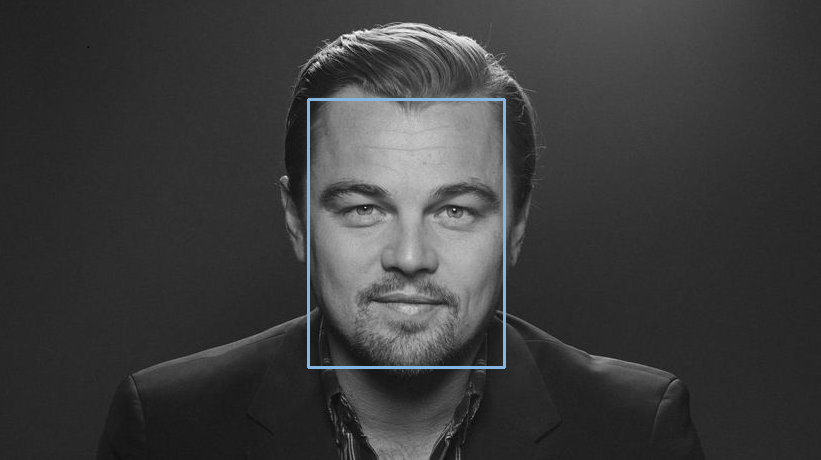
OFIQ face
Keypoints
The Face allows also retrieval of facial keypoints.
- Right Eye Outer Corner - Key point for evaluating reliability of right eye outer corner. See Face::Keypoints::RightEyeOuterCorner for more details.
- Right Eye Centre - Key point for evaluating reliability of right eye centre. See Face::Keypoints::RightEyeCentre for more details.
- Left Eye Inner Corner - Key point for evaluating reliability of inner corner of left eye. See Face::Keypoints::LeftEyeInnerCorner for more details.
- Left Eye Centre - Key point for evaluating reliability of left eye centre. See Face::Keypoints::LeftEyeCentre for more details.
- Left Eye Outer Corner - Key point for evaluating reliability of outer corner of left eye. See Face::Keypoints::LeftEyeOuterCorner for more details.
- Nose Root - Key point for evaluating reliability of nose root. See Face::Keypoints::NoseRoot for more details.
- Nose Right Bottom - Key point for evaluating reliability of right bottom of nose. See Face::Keypoints::NoseRightBottom for more details.
- Nose Tip - Key point for evaluating reliability of nose tip. See Face::Keypoints::NoseTip for more details.
- Nose Left Bottom - Key point for evaluating reliability of left bottom of nose. See Face::Keypoints::NoseLeftBottom for more details.
- Nose Bottom - Key point for evaluating reliability of bottom of nose. See Face::Keypoints::NoseBottom for more details.
- Mouth Right Corner - Key point for evaluating reliability of right corner of mouth. See Face::Keypoints::MouthRightCorner for more details.
- Mouth Center - Key point for evaluating reliability of center of mouth. See Face::Keypoints::MouthCenter for more details.
- Mouth Left Corner - Key point for evaluating reliability of left corner of mouth. See Face::Keypoints::MouthLeftCorner for more details.
- Mouth Upper Edge - Key point for evaluating reliability of upper edge of mouth. See Face::Keypoints::MouthUpperEdge for more details.
- Mouth Lower Edge - Key point for evaluating reliability of lower edge of mouth. See Face::Keypoints::MouthLowerEdge for more details.
- Right Eyebrow Outer End - Key point for evaluating reliability of outer end of right eyebrow. See Face::Keypoints::RightEyebrowOuterEnd for more details.
- Right Eyebrow Inner End - Key point for evaluating reliability of inner end of right eyebrow. See Face::Keypoints::RightEyebrowInnerEnd for more details.
- Left Eyebrow Inner End - Key point for evaluating reliability of inner end of left eyebrow. See Face::Keypoints::LeftEyebrowInnerEnd for more details.
- Left Eyebrow Outer End - Key point for evaluating reliability of outer end of left eyebrow. See Face::Keypoints::LeftEyebrowOuterEnd for more details.
- Right Edge - Key point for evaluating reliability of right edge of face. See Face::Keypoints::RightEdge for more details.
- Chin Tip - Key point for evaluating reliability of tip of chin. See Face::Keypoints::ChinTip for more details.
- Left Edge - Key point for evaluating reliability of left edge of face. See Face::Keypoints::LeftEdge for more details.
-
c++auto keypoints = face->GetKeypoints();DotsShape dots;dots.Add(keypoints->RightEyeOuterCorner());dots.Add(keypoints->RightEyeCentre());dots.Add(keypoints->RightEyeInnerCorner());dots.Add(keypoints->LeftEyeInnerCorner());dots.Add(keypoints->LeftEyeCentre());dots.Add(keypoints->LeftEyeOuterCorner());dots.Add(keypoints->NoseRoot());dots.Add(keypoints->NoseRightBottom());dots.Add(keypoints->NoseTip());dots.Add(keypoints->NoseLeftBottom());dots.Add(keypoints->NoseBottom());dots.Add(keypoints->MouthRightCorner());dots.Add(keypoints->MouthCenter());dots.Add(keypoints->MouthLeftCorner());dots.Add(keypoints->MouthUpperEdge());dots.Add(keypoints->MouthLowerEdge());dots.Add(keypoints->RightEyebrowOuterEnd());dots.Add(keypoints->RightEyebrowInnerEnd());dots.Add(keypoints->LeftEyebrowInnerEnd());dots.Add(keypoints->LeftEyebrowOuterEnd());dots.Add(keypoints->RightEdge());dots.Add(keypoints->ChinTip());dots.Add(keypoints->LeftEdge());auto keypointImg = keypoints->GetImage()->DrawShape(dots);keypointImg->SaveAs("output/keypoints.png");
-
java Face face = faces.get(0);Face.Keypoints keypoints = face.GetKeypoints();DotsShape dots = new DotsShape();dots.Add(keypoints.RightEyeOuterCorner());dots.Add(keypoints.RightEyeCentre());dots.Add(keypoints.RightEyeInnerCorner());dots.Add(keypoints.LeftEyeInnerCorner());dots.Add(keypoints.LeftEyeCentre());dots.Add(keypoints.LeftEyeOuterCorner());dots.Add(keypoints.NoseRoot());dots.Add(keypoints.NoseRightBottom());dots.Add(keypoints.NoseTip());dots.Add(keypoints.NoseLeftBottom());dots.Add(keypoints.NoseBottom());dots.Add(keypoints.MouthRightCorner());dots.Add(keypoints.MouthCenter());dots.Add(keypoints.MouthLeftCorner());dots.Add(keypoints.MouthUpperEdge());dots.Add(keypoints.MouthLowerEdge());dots.Add(keypoints.RightEyebrowOuterEnd());dots.Add(keypoints.RightEyebrowInnerEnd());dots.Add(keypoints.LeftEyebrowInnerEnd());dots.Add(keypoints.LeftEyebrowOuterEnd());dots.Add(keypoints.RightEdge());dots.Add(keypoints.ChinTip());dots.Add(keypoints.LeftEdge());Image keypointImg = keypoints.GetImage().DrawShape(dots);keypointImg.SaveAs("output/keypoints.png");
-
csharp var face = faces[0];var keypoints = face.GetKeypoints();var dots = new DotsShape();dots.Add(keypoints.RightEyeOuterCorner());dots.Add(keypoints.RightEyeCentre());dots.Add(keypoints.RightEyeInnerCorner());dots.Add(keypoints.LeftEyeInnerCorner());dots.Add(keypoints.LeftEyeCentre());dots.Add(keypoints.LeftEyeOuterCorner());dots.Add(keypoints.NoseRoot());dots.Add(keypoints.NoseRightBottom());dots.Add(keypoints.NoseTip());dots.Add(keypoints.NoseLeftBottom());dots.Add(keypoints.NoseBottom());dots.Add(keypoints.MouthRightCorner());dots.Add(keypoints.MouthCenter());dots.Add(keypoints.MouthLeftCorner());dots.Add(keypoints.MouthUpperEdge());dots.Add(keypoints.MouthLowerEdge());dots.Add(keypoints.RightEyebrowOuterEnd());dots.Add(keypoints.RightEyebrowInnerEnd());dots.Add(keypoints.LeftEyebrowInnerEnd());dots.Add(keypoints.LeftEyebrowOuterEnd());dots.Add(keypoints.RightEdge());dots.Add(keypoints.ChinTip());dots.Add(keypoints.LeftEdge());var keypointImg = keypoints.GetImage().DrawShape(dots);keypointImg.SaveAs("output/keypoints.png");
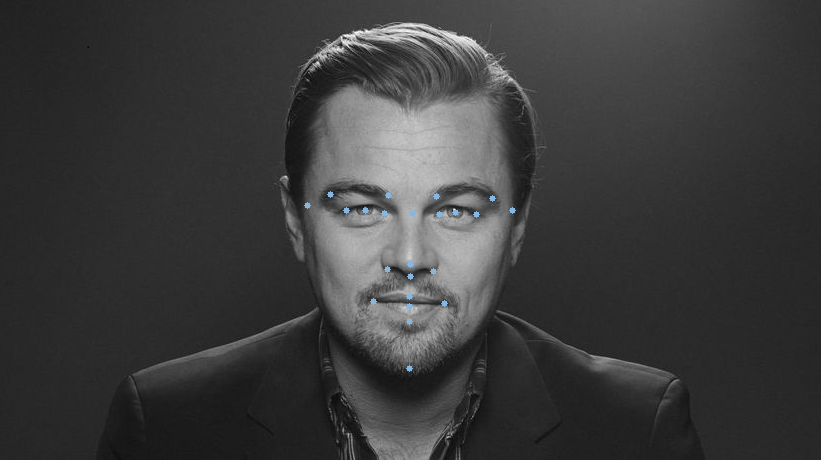
Face keypoints
Face Passive Liveness
- Note
- Access to the passive liveness feature requires explicit permission in the license to enable face passive liveness.
We are providing following passive liveness calculations:
- fast - Passive liveness mode with best performance available but worse accuracy as ACCURATE mode.
The Face::PassiveLivenessMode::FAST operates with higher speed but lower accuracy, whereas the Face::PassiveLivenessMode::ACCURATE is slower but provides increased accuracy, irrespective of the chosen FaceDetector::Config.
-
c++auto capture = FaceCapture::Create(std::move(img));FaceDetector fd;auto face = capture->DetectWith(fd)[0];auto plf = face->PassiveLiveness(Face::PassiveLivenessMode::FAST);std::cout << " Fast PL: " << plf << std::endl;auto pla = face->PassiveLiveness(Face::PassiveLivenessMode::ACCURATE);std::cout << " Accurate PL: " << pla << std::endl;
-
java Image img = Image.Decode(BinaryFile.ReadAll("assets/liveness_face.png"));FaceCapture capture = new FaceCapture(img);FaceDetector fd = new FaceDetector();Face face = capture.DetectWith(fd).get(0);System.out.println(" Fast PL: "+ face.PassiveLiveness(Face.PassiveLivenessMode.FAST));System.out.println(" Accurate PL: "+ face.PassiveLiveness(Face.PassiveLivenessMode.ACCURATE));
-
csharp Image img = Image.Decode(BinaryFile.ReadAll("assets/liveness_face.png"));FaceCapture capture = new FaceCapture(img);FaceDetector fd = new FaceDetector();Face face = capture.DetectWith(fd)[0];System.Console.WriteLine(" Fast PL: " +face.PassiveLiveness(Face.PassiveLivenessMode.FAST));System.Console.WriteLine(" Accurate PL: " +face.PassiveLiveness(Face.PassiveLivenessMode.ACCURATE));
- Passive Liveness Scores, Error Rates and Accuracy
- APCER: Attack presentation images that are classified as bona-fide presentations are false accepts. The percentual rate of such error on a given dataset and given threshold represents the Attack Presentation Classification Error Rate (APCER, formerly FAR).
- BPCER: Bona-fide presentation images that are classified as attacks are false rejects. The percentual rate of such error on a given dataset and given threshold represents the Bona-fide Presentation Classification Error Rate (BPCER, formerly FRR).
Example:
Imagine a dataset of 10,000 bona-fide presentation photos (real faces) and 1,000 attack presentation photos, where measurements were made. Threshold of 89.5, which is at working point of 1% APCER results in 3.7% BPCER. That means there are 10 attack presentation photos marked as bona-fide (false accepts) and 370 bona-fide photos are marked as attacks (false rejects).
Fast Passive Liveness Thresholds
| Use case type | Threshold | Performance |
|---|---|---|
| Convenience (minimum rejected attempts) | 80.0 | 2.75% APCER @ 1 % BPCER |
| Balanced (equal error rate) | 83.2 | 1.76% both APCER & BPCER |
| Security (minimum accepted frauds) | 86.2 | 3.62% BPCER @ 1% APCER |
Face Attributes Reliability
In some cases the meaningfulness of attribute value relies on values of other attributes. We provide following reliability checks
- ICAOReliability - Check if Face will fullfil ICAO requirements.
- TemplateReliability - Check if template extraction will be reliable.
- AgeReliability - Check if calculation of Age attribute will be reliable.
- GlassStatusReliability - Check if calculation of Glass Status attribute will be reliable.
- TintedGlassesReliability - Check if calculation of Tinted Glasses attribute will be reliable.
- SegmentationMaskReliability - Check if calculation of Segmentation Mask in functions Face::FaceAreaSegment, Face::FaceAreaSegment(RGB), Face::FaceAreaMask will be reliable.
- FaceSizeReliability - Check if calculation of Face Size attribute will be reliable.
- MouthOpennessReliability - Check if calculation of Mouth Openness attribute will be reliable.
- UniversalPassiveLivenessReliability - Check if calculation of Universal passive liveness will be reliable.
-
c++ICAOReliability icao;auto failedAttributes = icao.Validate(face);for (const auto& a : failedAttributes){std::cout << " Value " << a.value << " of " << a.id << " is not in range ["<< a.min << ", " << a.max << "]" << std::endl;}
-
java ICAOReliability icao = new ICAOReliability();for (FailedFaceAttribute a : icao.Validate(face)) {System.out.println(" Value " + a.getValue() + " of " + a.getId()+ " is not in range [" + a.getMin() + ", " + a.getMax()+ "]");}
- csharp
Best practices for use of Face Images
We provide following best practice checks
- ISOFullFrontalImageValidator - Check if usage of Full Frontal Images on travel documents will follow best practices, as described in Section B.3.2 Best practices for use of Full Frontal Images on travel documents [6].
-
c++ISOFullFrontalImageValidator icaoFullFrontal;auto failedAttributes = icaoFullFrontal.Validate(face);for (const auto& a : failedAttributes){std::cout << " Value " << a.value << " of " << a.id << " is not in range ["<< a.min << ", " << a.max << "]" << std::endl;}
-
java ISOFullFrontalImageValidator icaoFullFrontal = new ISOFullFrontalImageValidator();for (FailedFaceAttribute a : icaoFullFrontal.Validate(face)) {System.out.println(" Value " + a.getValue() + " of " + a.getId()+ " is not in range [" + a.getMin() + ", " + a.getMax()+ "]");}
- csharp
ISO Conversion
ISO Image
It is possible to convert Face to ISO image compliant with ISO 19794-5:2011 and back from image to FaceCapture.
-
c++FaceAttributes fa;fa.SetCaptureDeviceVendorID(FaceCaptureDeviceVendorID(11));fa.SetCaptureDeviceTypeID(FaceCaptureDeviceTypeID(7));auto faceCapture = FaceCapture::Create(std::move(image), fa);FaceDetector faceDetector;auto face = faceCapture->DetectWith(faceDetector)[0];std::cout << " Conversion Face to ISO image" << std::endl;auto encoder = PngImageEncoder();auto isoImage = face->ToIsoImage(encoder);std::cout << " Conversion ISO to Face image" << std::endl;auto faceImage = faceCapture->FromIsoImage(isoImage);
-
java Image img = Image.Decode(BinaryFile.ReadAll("assets/faces.png"));FaceAttributes fa = new FaceAttributes();fa.SetCaptureDeviceTechnology(FaceCaptureDeviceTechnology.STATIC_PHOTOGRAPH_FROM_SCANNER);fa.SetCaptureDeviceVendorID(new FaceCaptureDeviceVendorID(11));fa.SetCaptureDeviceTypeID(new FaceCaptureDeviceTypeID(7));FaceCapture faceCapture = new FaceCapture(img, fa);FaceDetector faceDetector = new FaceDetector();Face face = faceCapture.DetectWith(faceDetector).get(0);System.out.println(" Conversion Face to ISO image");PngImageEncoder encoder = new PngImageEncoder();Bytes isoImage = face.ToIsoImage(encoder);System.out.println(" Conversion ISO to Face image");FaceCapture faceImage = FaceCapture.FromIsoImage(isoImage);
-
csharp Image image = Image.Decode(BinaryFile.ReadAll("assets/faces.png"));FaceAttributes fa = new FaceAttributes();FaceCaptureDeviceTechnology.STATIC_PHOTOGRAPH_FROM_SCANNER);fa.SetCaptureDeviceVendorID(new FaceCaptureDeviceVendorID(11));fa.SetCaptureDeviceTypeID(new FaceCaptureDeviceTypeID(7));FaceCapture faceCapture = new FaceCapture(image, fa);FaceDetector faceDetector = new FaceDetector();var face = faceCapture.DetectWith(faceDetector)[0];System.Console.WriteLine(" Conversion Face to ISO image");var encoder = new PngImageEncoder();var isoImage = face.ToIsoImage(encoder);System.Console.WriteLine(" Conversion ISO to Face image");var faceImage = FaceCapture.FromIsoImage(isoImage);