Digital Identity Lifecycle
A Digital Identity is the record of one verification attempt. A Customer is the master record for a person and links to all their Digital Identities over time. This page explains the states a Digital Identity moves through and how it relates to the Customer.
Outcome states
When a workflow finishes, its Digital Identity lands in one of these states:
| State | Meaning |
|---|---|
| Incomplete | The User abandoned the flow or capture never produced usable data. No decision was made. |
| Accepted | The identity was trusted and all required checks passed. |
| Review | The result is ambiguous — a back-office operator must Accept or Reject it. |
| Rejected | The identity was not proven, or a check failed. May be a genuine failure (poor capture) or a fraud attempt. |
| Anonymized | Personal data has been erased (GDPR). A terminal state reachable from Accepted, Review, or Rejected. |
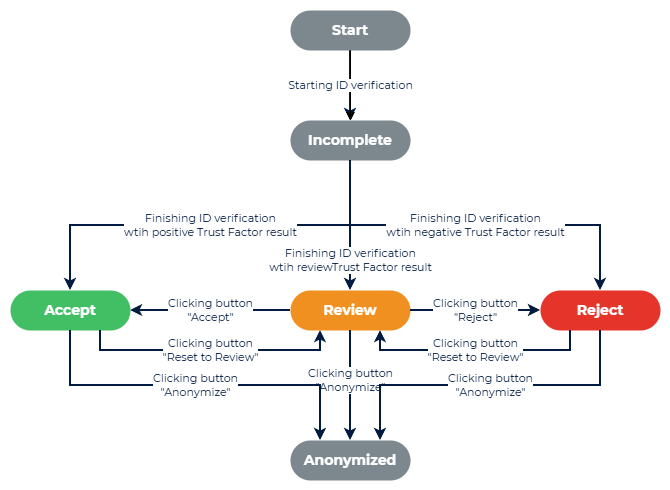
Review is the human-in-the-loop state. A stale review is auto-rejected after a configurable number of days so records never sit unresolved indefinitely.
Duplicity check and relationship to the Customer
An onboarding that is Accepted and does not match anyone already in the database creates a new Customer, and that first Digital Identity becomes the Customer's primary identity. The duplicity check (1:N identification) can however find the new onboarding to match existing record (to have a hit). In such a case, the record needs to be resolved by deciding the Customer is unique or the record is merged with an existing customer. The record can be also merged with a Blocklisted Customer - this is a Customer record that is in a different watchlist.
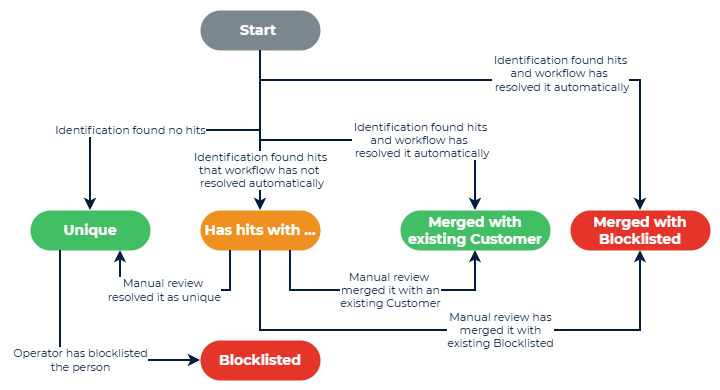
Later verifications for the same person add more Digital Identities to that Customer. Depending on the workflow and what the checks find, an accepted attempt can be:
| Result | What happens to the Customer |
|---|---|
| New customer | A new Customer record is created; this Digital Identity becomes its primary. |
| Updated | The identity matched the existing Customer and refreshed their personal data; primary identity is re-pointed to the new attempt. |
| Merged | The identity matched an existing Customer and is linked to them for history, without changing the master data. |
| Blocked | An operator has put the Customer on the Blocklist, or the identity matched a blocklisted person. In the predefined workflows a rejected attempt that matched a blocklisted person is linked to that blocked Customer; it does not create a new blocklist entry. |
Which of these a workflow performs is configurable — see Duplicity check and Workflows.
Customer states and matching
Each Customer carries a state that controls how future attempts by that person are handled:
| Customer state | Future onboarding attempts | Personal data |
|---|---|---|
| Active | Face-matched against this person to recognize returning customers. | Retained. |
| Blocked | Rejected on a face or document match by the predefined workflows. A face that is only similar (review band) goes to manual review instead. | Retained for fraud detection. |
| Anonymized | Not matched — the biometric template and personal data are deleted. | Erased. |
Anonymization (GDPR compliant)
Anonymizing a Customer erases their personal data and biometric template and replaces stored images with placeholders, while keeping non-personal audit information. It is irreversible and cascades to the Customer's Digital Identities. The Company decides, per its retention policy, when to anonymize — for example, a person who failed onboarding for a non-fraud reason should not be retained longer than needed.
See also
- Reference → Digital Identity States — the full state model in detail
- Manual Review — how operators resolve Review-state identities
- Key Concepts