ID Document Data Extraction - OCR
The OCR component of the Identity Verification Toolkit extracts text and image data from the image of ID card. Learn more about OCR data extraction.
Optical Character Recognition (OCR) functionality of the IDV Platform processes the image of identity documents of customer whose identity is verified, and extracts text and image data from those images.
If there is an MRZ field, it is parsed and its information are returned as an alternative value of the text fields. The MRZ field is also used for cross-checking the data from the Visual Inspection Zone (VIZ).
Definition of Identity Documents supported by Innovatrics
Identity document is an official document that proves person's identity. This is done by providing person's face and the name and other details that uniquely identify then.
Data needed to uniquely identify a person:
- face photo
- name (full name whether in one field or split to multiple fields)
- date of the birth
- additional identifiers needed, like personal number, parent's names, etc.
Data needed for unique ID document:
- document unique number
- date of document expiry (There are existing documents that do not expire, but this practice is now avoided by governments, as the photos need to be updated on the documents regularly to cope with person's aging. Old documents without expiration can be supported, but may have downsides, like a low face matching score.)
Dimensions of supported documents:
- TD1 86 x 54 mm
- TD2 105 x 74 mm
- TD3 125 x 88 mm
- non-standardized documents with similar dimensions
Supported Identity Document Types
IDV Platform can support identity documents of the following types:
- Passports
- Identity cards
- Driving licenses
- Foreigner permanent residence cards
- and other cards of similar format containing a photo of the holder
The support for document recognition is in multiple levels:
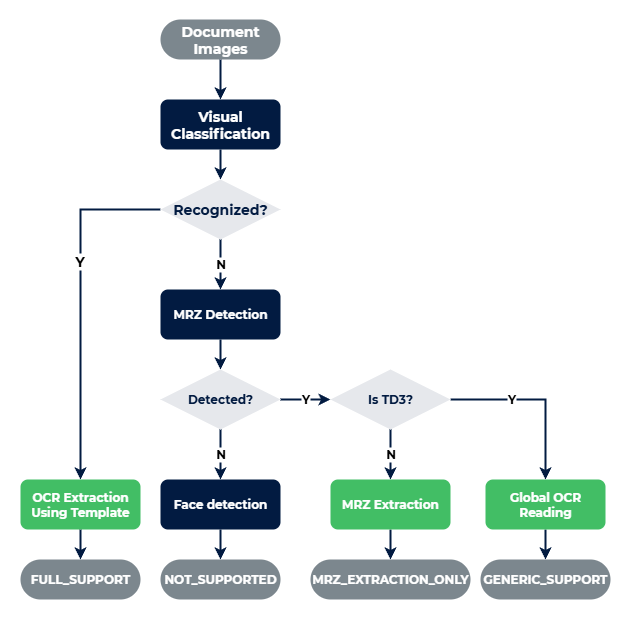
- NOT_SUPPORTED are documents where IDV Platform does not support reading of any text.
- MRZ_EXTRACTION_ONLY, also as Level 1 means that document does not have a specific template, the extraction is done from the data found in the MRZ zone.
- GENERIC_SUPPORT is for documents that have one generic template for multiple documents following the same standard, like passports.
- FULL_SUPPORT, also as Level 2 means that the document has a dedicated template and extraction of all the data is done in both visual inspection zone (VIZ) and MRZ zone (if present).
For Full Level 2 support, IDV Platform needs to be trained to support each individual document type and its edition. Please check the availability of the required document in the list of supported documents for both levels. In the case an ID document type required for your project is not mentioned in the list, a future version can be trained to support it. Please contact Innovatrics to request it.
Document Support Levels
The document falls into the support level based on these conditions:
Generic OCR Support for Global Passports
If a passport is not fully supported, a separate model is used to read its visual zone. This one detects the texts in the document and identifies their field type. The greatest benefit of this model compared to MRZ extraction is that the names are not truncated in the visual zone. The following Latin text fields are supported by this model:
- Full name, or Given names and Surname
- Document number
- Personal number
- Date of Birth
- Date of Expiry
- Date of Issue
- Nationality
- Place of birth
- Issuing Authority
Document Classification
Before processing the OCR, the images of the document pages needs to be classified. The classification uses two methods. Visual classification is searching for an image template (among the supported document types) with highest similarity to the processed page. MRZ classification reads the country ISO code from the MRZ zone (if present) and identifies the number of rows and letters in it to identify the document type.
The document page image can be classified as one of these 3 types:
- Front page
- Back page
- Page of an unknown document
When a new page is uploaded, it gets a list of possible classification candidates. Based on these candidates, it is decided, whether it is a front or a back page (or unknown document). If there was an image with same document page type (front/back) uploaded before, it gets replaced. So only the last submitted pages of each type contribute to the classification of the ID document.
When deciding the classification of the document, all the classification candidates are tried to be matched for the same document type between the front page and the back page. A classification pair with the highest sum of confidences decides the classification of the whole document. After OCR there might be an extra check to validate, if the classification was correct based on the extracted texts. If a misclassification was detected, the classification pair with the second highest sum of confidences is chosen for the document classification.
Document authenticity
IDV Platform provides technology to check the authenticity of an identity document, more about it is in the Document Authenticity Evaluation.
Document photo quality check
The document page photo quality checks if the photo of the document has the correct brightness, sharpness, doesn't contain hotspots, has enough background borders around the document in the image, and is the correct size.
Image requirements
- The supported image formats are JPEG and PNG
- The document image must be large enough - document card width should be approximately 750 pixels on the image
- The document card edges must be clearly visible and be placed at least 10 px inside the image area
- The image must be sharp enough for the human eye to recognize the text
- There should be no glare on the document card that obscures the text or photo
- The image should not contain objects or backgrounds with visible edges. This can confuse the detection process
- The document should not be a specimen