Workflows and queues
Every forensic deployment has its own internal procedures – who is allowed to enrol a new criminal record, who can confirm a hit, what the four-eyes principle requires, when supervision is mandatory. Innovatrics ABIS Criminal Investigation supports these procedures through a configurable workflow engine built around three pillars:
- State machines that define the legal transitions of the core entities (criminal records, evidences, examinations, hitlists).
- Resolve queues that hold work items waiting for human operators to decide.
- Resolve queue actions that move a work item from Unresolved to Resolved in a controlled, auditable way.
Why workflows matter in criminal work
Forensic work is governed by strict procedural rules. The workflow engine enforces them programmatically so that:
- every change of state is performed by an authorised user,
- the four-eyes principle is enforced where required (one operator analyses, another verifies),
- every transition is logged for audit,
- the queue length and SLAs of the team are visible at any moment.
Hitlists, the core of the workflow engine
A hitlist is the basic unit of work that traverses the workflow engine. Hitlists are created automatically (as a result of a non-happy path of deduplication, biometric update or identification) or manually (by an operator request to merge or split records).
Four hitlist types are supported:
- Duplicate – an unexpected biometric match between a newly enrolled criminal record and an existing one (deduplication).
- Mismatched – an unexpected biometric non-match during a biometric update (renewal).
- Split – a manual request to split one Biometric Individual into two.
- Merge – a manual request to merge two Biometric Individuals into one.
A hitlist groups one or more hits. Hits are the actual relations between the applicant records of the probe and reference biometric individuals (cartesian-product style across all applicants of the two BIs). Each hit carries metadata such as the biometric matching score.
Resolve queues
Hitlists are stored in resolve queues based on their type. Every hitlist type has its own primary queue, where freshly-created hitlists end up. Operators work through the queue in a controlled order; once they have made a decision the hitlist is moved to a "Resolved" queue where it stays for audit.
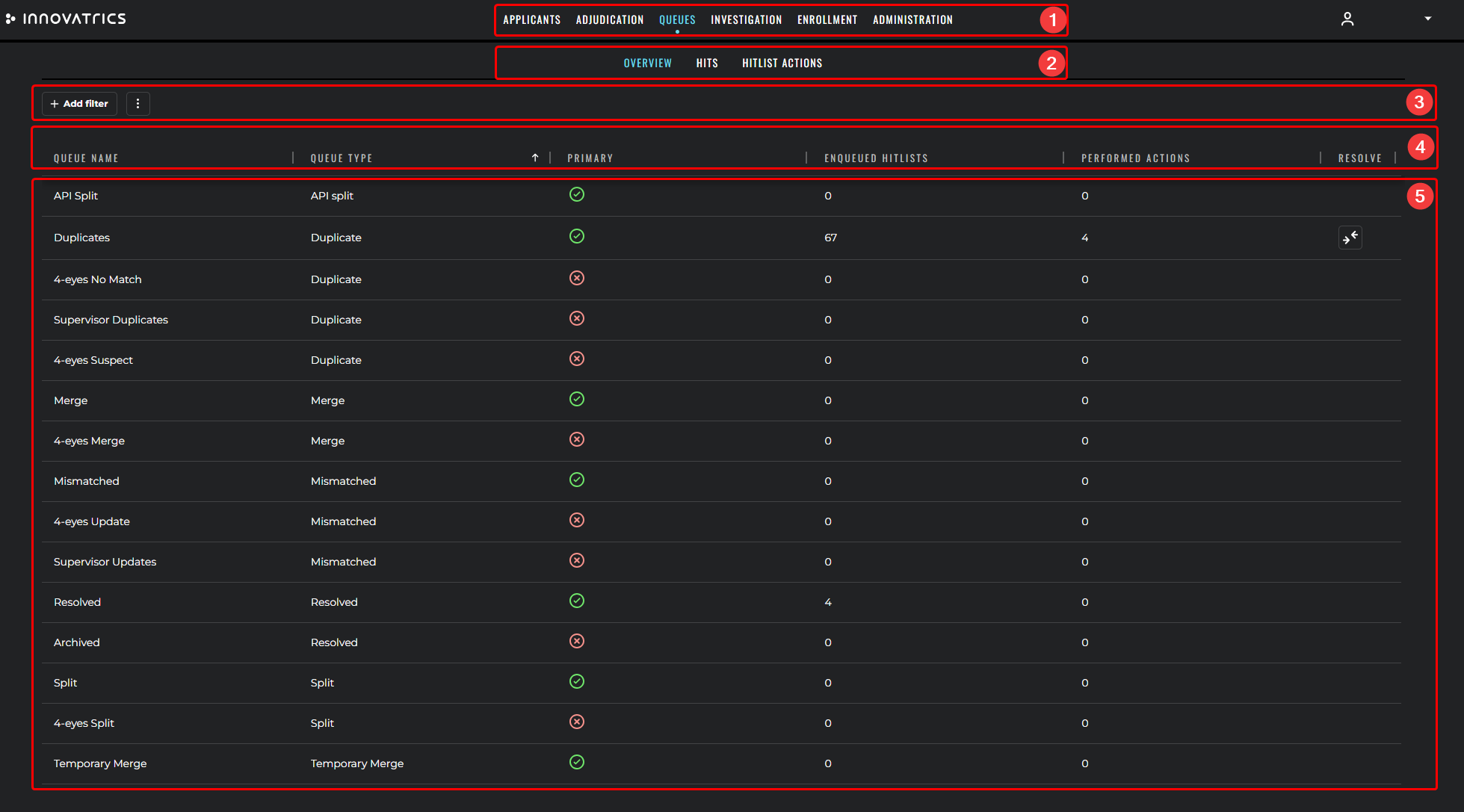
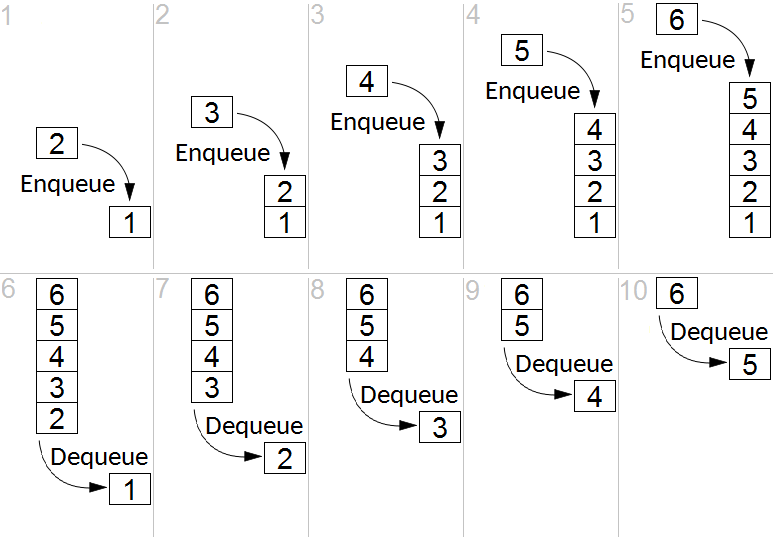
Items in a queue are processed in FIFO order:
Resolve queues can be partitioned by criteria such as:
- the gallery in which the hitlist appeared,
- the priority assigned by the system,
- the role / team / region that should handle the hitlist,
- the type of crime referenced by the originating case.
This makes it easy for an agency to route work to the right specialist – for instance, latent-print specialists never see face-only hitlists, and homicide-related work never lands on a junior examiner's queue.
Resolve queue actions
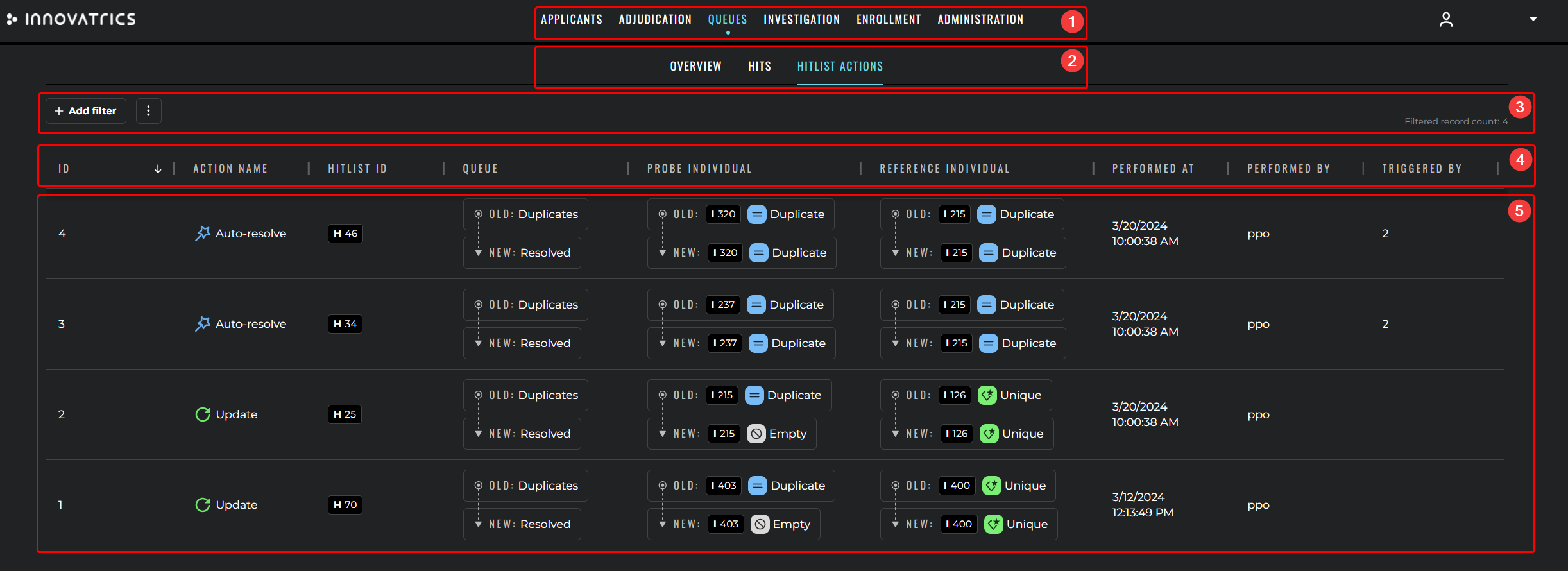
A resolve queue action is the operation an operator performs to move a hitlist from Unresolved to Resolved. The available actions depend on the hitlist type. The most common ones are:
- Merge – merges two BIs; the merged BI keeps the primary applicant of the reference BI; the probe primary applicant is transitioned to Archived.
- Update – merges two BIs; the merged BI keeps the primary applicant of the probe BI; the reference primary applicant is transitioned to Archived.
- No Match – marks a Duplicate hitlist as a false positive without merging.
- Reject – marks a Mismatched hitlist as a confirmed mismatch without merging.
- Comparison – merges based on a custom attribute that decides which applicant becomes primary.
- Queue – transfers the hitlist between two queues of the same type (e.g. from a junior queue to a senior queue).
- Merge and reject – merges into one BI but transitions the probe applicants to Rejected.
- Cancel – resolves a Merge hitlist without performing the merge.
- Revert – resolves a Split hitlist without performing the split.
Four-eyes control
Resolve queue actions can be configured to require four-eyes confirmation – the work item must be approved by at least two distinct users before the transition is applied. Four-eyes is most commonly enforced on:
- confirmation of an Individualized hit during ACE-V verification,
- merging of two BIs when a duplicate is detected,
- deletion of a criminal record,
- transitions to terminal states such as Rejected or End of life.
Examination workflows
Independently from the hitlist workflows, the ACE-V workflow tracks the progress of every examination through the Analysis, Comparison / Evaluation and Resolved states. The state machine is described in detail in ACE-V methodology.
The behaviour of the ACE-V workflow is fully configurable per deployment, including which examination kinds are used, how transitions between states are confirmed, which resolutions are available, and which licence rights are enabled. See ACE-V configuration for an overview of the configurable areas.
Custom transitions and validations
Every transition can have additional custom validations plugged in. A typical example in criminal work is:
- before transitioning a record to End of life, force the upload of a death certificate as an attachment;
- before confirming an Individualized hit on a wanted-person gallery, force the user to supply a free-text note;
- before deleting an applicant, require that no open case references the applicant.
Overall workflow picture
   New criminal       ┌──────────────┐    No hit       ┌─────────┐
   record enrolment ─►│ Deduplication│──────────────► │ Master  │
                      └──────┬───────┘                 └─────────┘
                             │ Hit
                             ▼
                      ┌──────────────┐ Resolve queue   ┌─────────────┐
                      │  Duplicate   │  action         │  Resolved   │
                      │   hitlist    │ ───────────────►│   hitlist   │
                      └──────────────┘                 └─────────────┘
For the API contract that drives the workflow engine please refer to the Hits API and the resolve-queue endpoints in the underlying ABIS Integration documentation.