Examinations and Hits
While cases and evidences organise the what of an investigation, examinations and hits organise the who, when and how of forensic decisions.
Examination
An examination is the unit of analytical work performed on a single piece of biometric evidence. Examinations are the entities that move through the ACE-V state machine and that carry the forensic decision.
What kinds of examinations exist
Innovatrics ABIS distinguishes several kinds of examinations, each tied to one of the ACE-V phases:
- Analysis examination – the unit in which an examiner studies one specific impression and decides whether it is suitable for identification (the A phase of ACE-V).
- Comparison examination – the unit in which an examiner compares the analysed probe with a particular reference candidate and reaches a Comparison / Evaluation decision (the C and E phases of ACE-V).
- Verification examination – the unit in which an examiner confirms or refutes a previous Comparison decision (the V phase of ACE-V).
In addition to these three classic ACE-V examination kinds, there is one specialised kind:
- Video examination – a special examination type used exclusively for video evidence, attached to one detected person ("tracklet") inside the video. Video examinations are not driven by the manual ACE-V state machine; they are produced automatically by the video processing pipeline.
ACE-V examinations (Analysis / Comparison / Verification) are only used for fingerprint / latent and face evidence. Evidence of type Other or DNA does not use examinations at all and has no ACE-V state history. Evidence of type Video uses only the specialised video examination kind described above.
How and when examinations are created
Each examination kind is created at a different moment of the workflow. The exact trigger – including whether a step happens automatically or only on explicit user action – is governed by the deployment's ACE-V configuration.
| Kind | Trigger |
|---|---|
| Analysis | Created either by direct user action or automatically on evidence upload, depending on configuration. Multiple Analyses can be created on the same evidence – for repeat analysis, for separating two prints on a single evidence, or to support blind ACE-V. |
| Comparison | Created by user action when the examiner picks one or more candidates from the identification result to compare against the analysed probe. One Comparison is created per selected candidate. |
| Verification | Created when a Comparison reaches a resolution that requires verification (in non-blind ACE-V). Creation can be initiated by the user or applied automatically, again depending on configuration. |
| Video | Created automatically by the Video Manager pipeline; one Video examination per detected person tracklet. |
If the parent evidence does not pass the Technical Assessment phase – i.e. it is judged unsuitable for analysis at the evidence level – no examinations are created at all.
The availability of Comparison and Verification kinds in a given deployment is also controlled by licensing: when the corresponding licence right is not enabled, the kind is hidden from the UI and rejected at the API level.
Hierarchy
Examinations form a parent / child tree rooted in the evidence. A Comparison is always the child of an Analysis, and a Verification (when present) is always the child of a Comparison.
Evidence
└── Analysis examination
    ├── Comparison examination (vs. candidate A)
    │   └── Verification examination          ← non-blind ACE-V only
    └── Comparison examination (vs. candidate B)
        └── Verification examination
The exact shape of the tree depends on the ACE-V mode active in the deployment:
- In non-blind ACE-V, an evidence typically has a single Analysis with Comparison children, and each Comparison whose resolution requires verification has a Verification child.
- In blind ACE-V, the primary and the verifying examiner work in parallel on their own Analyses and Comparisons, without seeing each other's results. The platform reconciles the two parallel results to confirm or reject the conclusion.
- For deployments that do not run ACE-V, the platform also supports a streamlined identification flow that does not produce Verification examinations.
Examination type in the API
The OpenAPI spec exposes a coarse-grained ExaminationType enum with two values: TECHNICAL_ASSESSMENT and EXAMINATION. The Analysis, Comparison and Verification distinction described above lives at the application / UI level and is reflected in the parent-child hierarchy and the assigned status, not in the type enum.
What every examination carries
Independently of its kind, every examination owns:
- the assignedToId of the examiner responsible for it,
- its own ACE-V status (Analysis / Comparison-Evaluation / Resolved) and resolution,
- its own AssetType, which is always identical to the AssetType of the parent evidence (a face evidence cannot have a fingerprint examination, and vice versa),
- its own history of snapshots of the working image,
- its own visual annotations,
- its own set of hits.
When an Analysis examination is created the system can optionally copy the image from the parent evidence; if no image is supplied at creation time, the original evidence image is used.
The Latent Editor and the Comparison Tool always operate on examinationId – never on the underlying evidenceId. This is what guarantees that the Primary and the Verification examiner working on the same evidence cannot influence each other.
Examination status
ABIS exposes two independent ACE-V status fields – one on the evidence and one on each examination. They have different value sets and different roles, and they advance separately.
The status machine on an individual examination is specific to its kind: every kind has its own in progress status (work has started) and its own done status (the kind has been resolved and the result is recorded).
| Examination kind | In-progress status | Done status |
|---|---|---|
| Analysis | Analysis in progress | Analysis done |
| Comparison | Comparison | Evaluation |
| Verification | Verification in progress | Verification done |
The resolution recorded on the done status carries the actual ACE-V outcome – for example Suitable for identification or Unsuitable for identification on the Analysis side, Individualized, Excluded or Inconclusive on the Comparison side, or a confirmation / refutation on the Verification side. The exact set of resolutions is configurable per deployment.
The Technical Assessment (TA) status is not present on any examination state machine – TA is tracked on the parent evidence instead, as described in ACE-V methodology. Until the evidence has passed TA, no examinations are created on it.
Examination assignment
Examinations are assigned to specific users. Roles such as Investigator, Forensic Technician, Examiner and Verification Examiner are configurable; whether the same person plays several roles or each role is performed by a different person is decided by the agency.
Examination snapshots
Every change applied to the working image of an examination – cropping, rotation, brightness/contrast adjustment, mask, minutiae editing – is stored as a snapshot. Snapshots are named, time-stamped and attributed to the user who created them. The examiner can revert to any earlier snapshot and continue editing from that checkpoint.
Hit
A hit is a record that documents the relationship between a probe and a candidate after the examiner has reached a conclusion. Hits are the official, court-relevant artefact of the comparison process.
Relation type
Hits carry a relation type that records the examiner's decision in line with the ACE-V Evaluation phase. The platform ships with three default relation types:
- Individualized – sufficient agreement to conclude that the two impressions originated from the same source.
- Excluded – sufficient disagreement to conclude that the two impressions originated from different sources.
- Inconclusive – neither sufficient agreement nor sufficient disagreement.
The set of available resolutions is configurable per deployment so that agencies that follow regional guidelines or use additional intermediate verdicts can adapt the system to their procedures.
In the Comparison Tool the examiner records a decision through a dedicated action bar; the platform also offers an optional iterator that walks through every unresolved candidate of the examination.
Hit deletion
Hits are soft-deleted. A deleted hit remains in the database for audit purposes and is excluded from hit counters. This guarantees that the forensic record is never silently changed.
Where hits are visible
A hit is shown in three different surfaces:
- Examination sidebar – the hits of one specific examination.
- Evidence Hits table – hits aggregated across all examinations of a single evidence.
- Case Hits table – hits aggregated across all evidences of the case.
Hit detail report
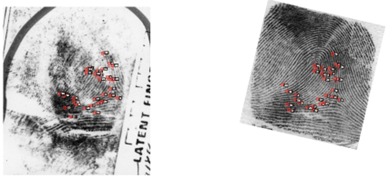
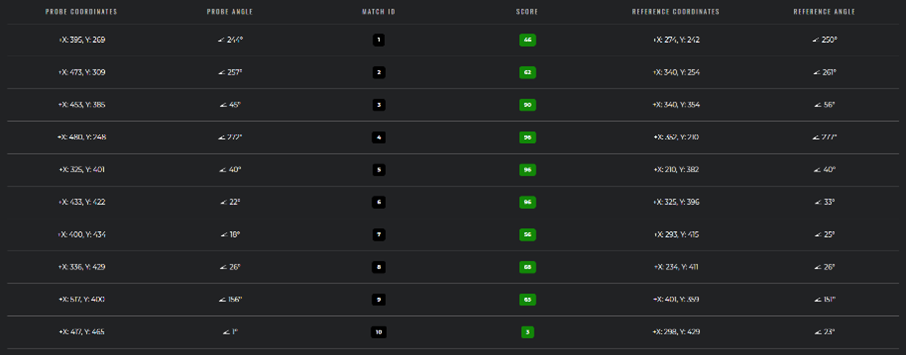
When an Individualized hit is recorded the system automatically generates a Hit detail report (PDF). The report contains the probe image, the reference image, matching minutiae (for prints) or eye-aligned views (for faces), visual annotations, score breakdown and the metadata of probe and candidate. The report is stored on the case and can be exported.
Hitlists
A hitlist is a higher-level construct that groups one or more hits awaiting human resolution. In the criminal context the most relevant hitlist types are:
- Duplicate – an unexpected biometric match between a newly enrolled criminal record and an existing one (created automatically during deduplication).
- Mismatched – an unexpected biometric non-match during a biometric update (renewal).
- Split – initiated when the system or a user wants to split one Biometric Individual into two.
- Merge – initiated when the system or a user wants to merge two Biometric Individuals into one.
Hitlists are created in the Unresolved state, queued in a resolve queue corresponding to their type, and resolved by an authorised user using a resolve queue action. After resolution they remain in ABIS for audit purposes.
For more detail on the workflow engine and the resolve queues, see Workflows and queues.
Visual annotations
Examiners can draw visual annotations over the working image of an examination – freehand strokes, ellipses, rectangles, arrows, text labels and minutia-style points. Annotations are stored as a separate layer that never modifies the source image and are linked to the snapshot in which they were created.
Annotations are scoped to the examination they were drawn in: each comparison or verification examination is a fully independent workspace, and annotations from one examination are not visible in another even when both reference the same biometric sample.
When a probe is being compared with a candidate, annotations on the two sides can be linked so that matching features are visually paired. Linked annotations are included in the Hit detail report.