Criminal records (Applicants) API
This chapter describes how to manage criminal records through the API. Criminal records are stored in ABIS as applicants – the underlying data model is the same as for any other ABIS use case, but in a Criminal Investigation deployment the records typically represent suspects, persons in custody, persons with prior arrests, persons of interest or wanted persons.
For the conceptual background see Criminal records (Applicants).
- You have generated client code from the OpenAPI specification (see the Connecting to ABIS section of the integration documentation).
- You have read the API integration overview and obtained an OAuth2 access token (see Authentication).
- The samples below are written in C# and Java.
Endpoints
| Operation | Verb / path |
|---|---|
| Create draft (build-up) | PUT applicants/{externalId}/draft |
| Capture (validation phase) | PUT applicants/{externalId}/capture |
| Enroll (quality + insertion in matcher) | PUT applicants/{externalId}/enroll |
| Read (basic / full) | GET applicants/{externalId} |
| Read all (bulk) | GET applicants |
| Technical update | PUT applicants/{externalId}/update |
| Partial (textual-only) update | PUT applicants/{externalId}/fields |
| Soft-delete | POST applicants/{externalId}/delete |
| Hard-delete | DELETE applicants/{externalId} |
| End-of-life | PUT applicants/{externalId}/end-of-life |
| Read modality (e.g. fingerprints) | GET applicants/{externalId}/fingerprints |
| Read modality instance image | GET applicants/{externalId}/fingerprints/{idx}/image |
Creation
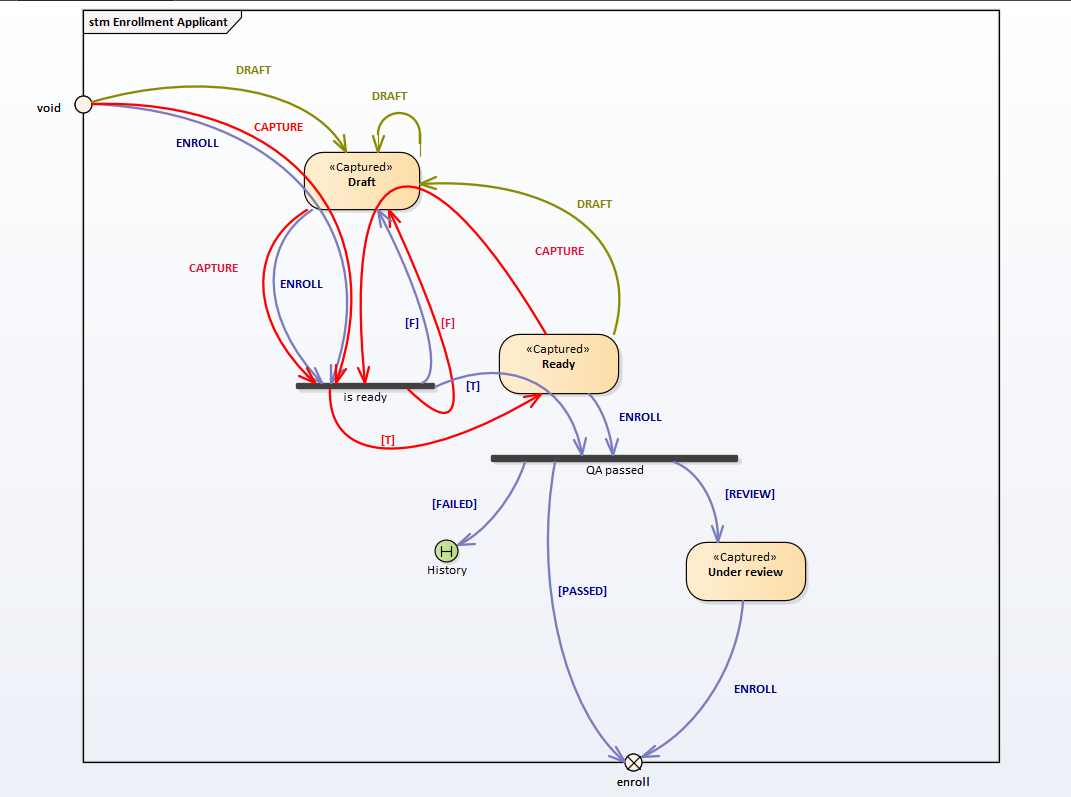
Creating a criminal record is a multi-step process designed to handle real-world enrolment, where the data arrives gradually:
- Draft phase – partial data is collected step by step. The record exists in ABIS but is not yet eligible for biometric matching. Each
PUT .../draftcall persists the current state. - Capture phase – the data collection is finished and the record is ready to be inserted into ABIS. Built-in guards (licence validity, record consistency) and any custom validations are evaluated.
- Enroll phase – quality validations are performed; if they pass, the templates are activated in the matcher and the record participates in identification and verification.
C# sample – draft, capture, enroll
var applicantsApi = new ApplicantsApi(BuildAbisConfiguration(accessToken));
var externalId = "CR-2026-000123"; // criminal record number assigned by the agency

// 1) Draft – upload demographic data
var draftRequest = new ApplicantDraftRequest
{
    Profile = new Profile
    {
        FirstName = "John",
        LastName  = "Doe",
        DateOfBirth = new DateTime(1985, 3, 14),
        Gender = "MALE"
    }
};
applicantsApi.Draft(externalId, draftRequest);

// 2) Draft – upload fingerprints
var fingerprintsRequest = new ApplicantDraftRequest
{
    Fingerprints = new List<Fingerprint>
    {
        new Fingerprint
        {
            Position = FingerprintPosition.RightIndex,
            Impression = ImpressionType.RolledContact,
            Image = new Image { Format = "wsq",
                                DataBytes = Convert.ToBase64String(File.ReadAllBytes("ri.wsq")) }
        }
    }
};
applicantsApi.Draft(externalId, fingerprintsRequest);

// 3) Capture
applicantsApi.Capture(externalId);

// 4) Enroll
var enrollResponse = applicantsApi.Enroll(externalId);
Console.WriteLine($"Enrolled criminal record {enrollResponse.ExternalId}");
Java sample – draft, capture, enroll
ApplicantsApi applicantsApi = new ApplicantsApi(buildAbisClient(accessToken));
String externalId = "CR-2026-000123";

ApplicantDraftRequest draft = new ApplicantDraftRequest()
        .profile(new Profile()
                .firstName("John")
                .lastName("Doe")
                .dateOfBirth(LocalDate.of(1985, 3, 14))
                .gender(Profile.GenderEnum.MALE));
applicantsApi.draft(externalId, draft);

ApplicantDraftRequest fingerprints = new ApplicantDraftRequest()
        .addFingerprintsItem(new Fingerprint()
                .position(Fingerprint.PositionEnum.RIGHT_INDEX)
                .impression(Fingerprint.ImpressionEnum.ROLLED_CONTACT)
                .image(new Image()
                        .format("wsq")
                        .dataBytes(Files.readAllBytes(Path.of("ri.wsq")))));
applicantsApi.draft(externalId, fingerprints);

applicantsApi.capture(externalId);
EnrollResponse enrollResponse = applicantsApi.enroll(externalId);
System.out.println("Enrolled criminal record " + enrollResponse.getExternalId());
Retrieval
To retrieve only the metadata, call the basic GET. To retrieve the full record (including biometric data URLs and per-modality details), use the fullResponse=true query parameter. Per-modality and per-instance helper endpoints are available, as is the withQualities=true flag for quality metadata.
var basic = applicantsApi.Get(externalId);
var full  = applicantsApi.Get(externalId, fullResponse: true, withQualities: true);
var leftIndex = applicantsApi.GetFingerprint(externalId, 0);
Update
Two update modes are supported:
- Technical update – the request must contain the entire record (including all binary data). Useful in early enrolment phases.
- Partial update – updates only the textual / demographic fields. The whole textual block must still be supplied, but binary data is left untouched.
var partial = new ApplicantFieldsUpdateRequest
{
    Profile = new Profile { FirstName = "John", LastName = "Doe", Aliases = new[] { "JD" } }
};
applicantsApi.UpdateFields(externalId, partial);
For a biometric update – i.e. updating the biometric data of an existing person – use the Biometric update / Renewal flow described in the underlying ABIS Core documentation. Renewal creates a new applicant record, biometrically compares it with the existing one and produces a Mismatched hitlist when the comparison fails.
Deletion
Three deletion semantics are supported:
| Operation | Effect |
|---|---|
DELETE applicants/{externalId} | Hard-delete – the record is fully removed; the externalId becomes available for reuse. |
POST applicants/{externalId}/delete | Soft-delete – templates are removed from the matcher; the record stays for audit. |
PUT applicants/{externalId}/end-of-life | The record is transitioned to End of life (e.g. on the death of the person). The record stays in the matcher to prevent fraud. |
The hard-delete operation is normally reserved for compliance scenarios (right-to-be-forgotten, error correction).
Galleries and biometric individuals
Galleries to which a record belongs are managed through the same endpoints – see the standard ABIS Core documentation for the full contract. The Biometric Individual envelope is automatically created and maintained by the platform; an integrator never has to manipulate it directly.
For biometric matching see Identification and Verification API.