Liveness
A liveness check (also called a spoof check) decides whether a detected face belongs to a real, present person or to a presentation attack: a face shown on a screen, a printed photo, a 2D or 3D mask. Face Matcher provides passive liveness only: the person does not have to perform any action, which keeps the flow seamless for access control and corridor use cases. Neural networks trained on real faces and on the attack types above return a liveness score, and a threshold turns it into pass or fail.
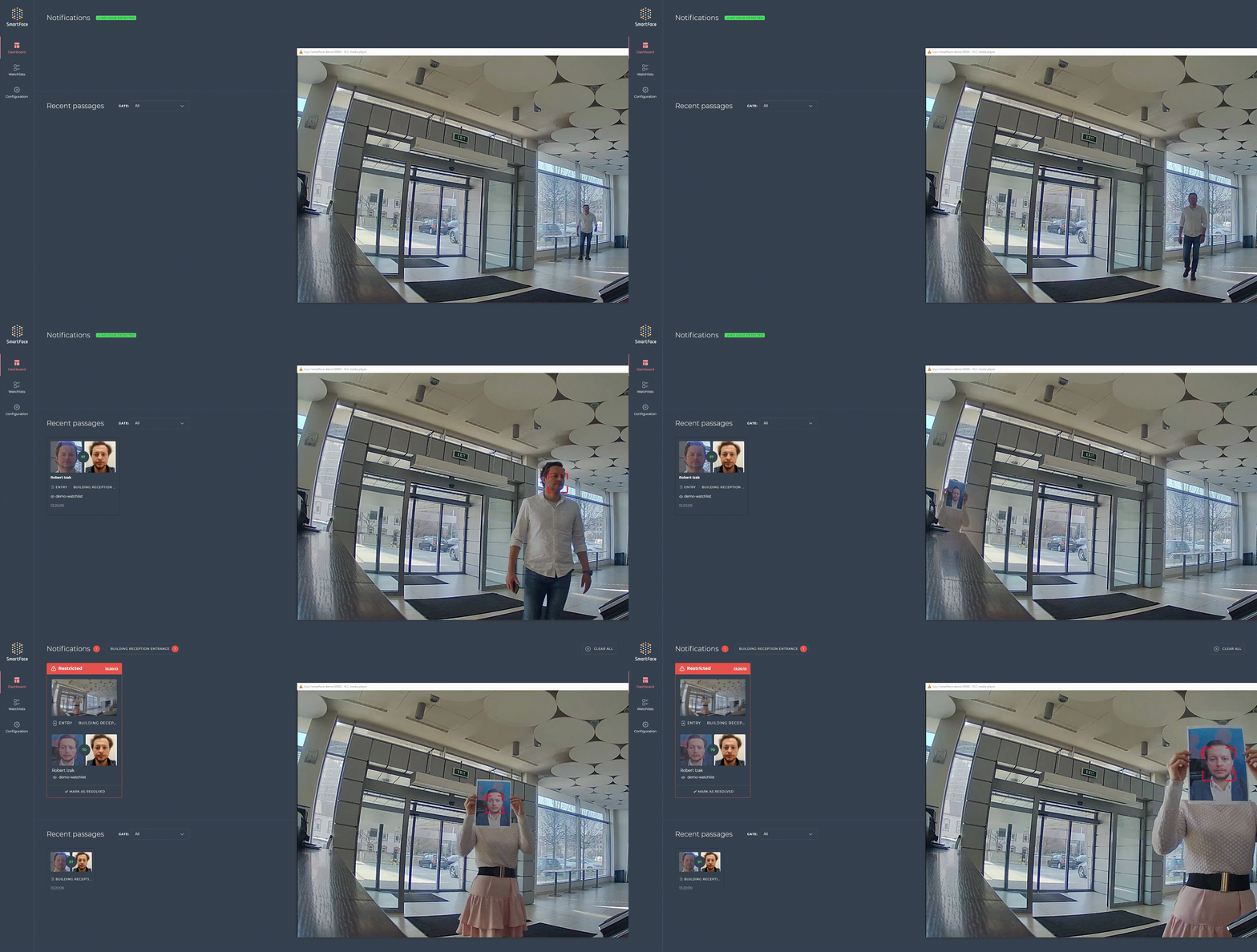
Two liveness types
| Type | Optimised for | Typical input |
|---|---|---|
| Distant | Faces captured "in the wild" by surveillance-style cameras. | Camera streams, corridor and gate cameras. Not recommended for selfies. |
| Nearby | Close-up faces. | Selfies, kiosk and enrollment images. |
The liveness service preloads both (Warmup__LivenessAlgorithms=Distant,Nearby); the distant network variant is chosen with Liveness__DistantAlgorithm (default fast). Both types can be requested for the same face; the response then aggregates them.
Inputs and flow
Liveness is available in three places, each with a slightly different flow:
- Live video processing, configured per camera or edge stream. By default only matched faces are evaluated (
SpoofDetection__SkipUnidentified=truein.env); an unmatched face gets no liveness result. Set the variable tofalseto evaluate every face. Edge streams that compute liveness on the device follow their own liveness strategy, see Edge streams. - Direct REST call
POST /api/v1/Faces/SpoofCheck: no matching is performed, liveness is always evaluated. - Watchlist search
POST /api/v1/Watchlists/Searchwith liveness enabled: same rule as live video, only matched faces are evaluated.
The quality rule "better input, better result" applies to liveness even more than to matching. Minimum requirements for the input: a frontal face, enough background around the face, the face not at the edge of the image, no strong backlight or sidelight, no over- or under-exposure, and no cropping or re-compression between capture and processing.
Conditions
Before a liveness network runs, the face must satisfy a condition string. If it does not, the check is reported as not performed with the failed condition as reason. Each liveness type has its own default set; the defaults are recommended unless the environment demands otherwise.
Distant default: FACE_CONFIDENCE: [1000; 10000]. Additional attributes you can add, with the values used in the extended example:
| Attribute | Min | Max | Meaning |
|---|---|---|---|
FACE_CONFIDENCE | 1000 | 10000 | Detector confidence of the face. |
FACE_SIZE | 30 | inf | Larger of eye distance and eye-to-mouth distance, in pixels. |
FACE_RELATIVE_AREA | 0.09 | inf | Face area relative to the image area. |
FACE_RELATIVE_AREA_IN_IMAGE | 0.9 | inf | Share of the face that is inside the image. |
YAW_ANGLE / PITCH_ANGLE | -20 | 20 | Head rotation around the vertical / horizontal axis (DIN 9300). |
SHARPNESS_RAW | 5000 | 70000 | Sharpness before normalization. |
BRIGHTNESS_RAW | 40000 | 230000 | Raw brightness of the face area. |
CONTRAST_RAW | 10000 | 90000 | Raw contrast of the face area. |
SPECULARITY_RAW | 5000 | 80000 | Raw specular reflection of the face area. |
Nearby default: FACE_CONFIDENCE: [1000; 10000]. Extended example values:
| Attribute | Min | Max | Meaning |
|---|---|---|---|
FACE_CONFIDENCE | 1000 | 10000 | Detector confidence of the face. |
FACE_SIZE | 60 | inf | Face size in pixels. |
FACE_RELATIVE_AREA | 0.25 | inf | Face area relative to the image area. |
YAW_ANGLE / PITCH_ANGLE | -20 | 20 | Head rotation (DIN 9300). |
BRIGHTNESS | -7800 | 5000 | Exposure of the face area (-10000 dark, 10000 light). |
CONTRAST | -5000 | 6000 | Contrast of the face area (-10000 low, 10000 high). |
SHARPNESS_RAW | 4000 | inf | Sharpness before normalization. |
UNIQUE_INTENSITY_LEVELS | 500 | 10000 | Number of distinct intensity levels in the face area. |
Conditions are written as ATTRIBUTE: [min; max] joined with &&, for example FACE_CONFIDENCE: [1000; 10000] && FACE_SIZE: [60; inf] && YAW_ANGLE: [-20; 20].
Thresholds
The liveness score is compared with a threshold per type: distantLivenessScoreThreshold and nearbyLivenessScoreThreshold, default 90 each. A higher threshold resists spoofing better but rejects more genuine users under difficult light; a lower one is more tolerant. How the threshold shapes false-accept and false-reject rates is discussed in Accuracy and thresholds.
The SpoofCheck call
POST /api/v1/Faces/SpoofCheck takes an image, the detectors to run and the configuration:
"spoofDetectorResourceIds": ["liveness_distant_any_remote"],
"spoofCheckConfig": {
  "distantLivenessScoreThreshold": 90,
  "nearbyLivenessScoreThreshold": 90,
  "distantLivenessConditions": "default",
  "nearbyLivenessConditions": "default",
  "keepEvaluatingConditionsAfterFirstFail": false
}
| Parameter | Values |
|---|---|
spoofDetectorResourceIds | liveness_distant_any_remote, liveness_distant_cpu_remote, liveness_distant_gpu_remote, liveness_nearby_any_remote, liveness_nearby_cpu_remote, liveness_nearby_gpu_remote, or none. GPU values need GPU acceleration. |
distantLivenessConditions, nearbyLivenessConditions | default or a custom condition string. |
keepEvaluatingConditionsAfterFirstFail | true reports every failed condition instead of only the first. |
The response reports the aggregate and each type separately:
{
  "performed": true,
  "passed": true,
  "distantLivenessSpoofCheck": {
    "performed": true, "passed": true, "score": 97,
    "notPerformedReasons": []
  },
  "nearbyLivenessSpoofCheck": {
    "performed": false, "passed": false, "score": 0,
    "notPerformedReasons": [{ "reasonMessage": "FACE_SIZE" }]
  }
}
performed is true when the conditions were met and the network ran; passed is true when the score reached the threshold. When a check was not performed, notPerformedReasons names the conditions that failed.
POST /api/v1/Faces/SpoofCheckdistantLivenessScoreThreshold and nearbyLivenessScoreThreshold, default 90 eachThe same fields appear on match events and in Station as Distant check / score and Nearby check / score, see Events and face metadata.
Other modalities
A separate passive liveness network evaluates palm images against palms shown on screens and printed palms. It is available per camera or edge stream (livenessScoreThreshold, default 85), as a direct call POST /api/v1/Palms/SpoofCheck, and inside POST /api/v1/Watchlists/SearchByPalm. The request selects the detector with spoofDetectorResourceIds (liveness_any_remote, or none to skip) and the threshold with spoofCheckConfig.livenessScoreThreshold; the response reports performed, passed and the palm liveness score. Palm setup is described in Palm processing.