Edge Watchlist Synchronization
Edge streams from smart cameras or AI boxes running the Embedded Stream Processor can identify people on the device itself, without sending every face to the server. For that they need a local copy of the watchlist members, and Face Matcher keeps that copy in sync. Synchronization is off by default and is enabled per edge stream. The concepts behind watchlists are in Watchlists; the edge side is described in Edge streams and Edge. The device needs Embedded Stream Processor 2.5 or newer.
What is synchronized
Edge devices do not know about watchlists, only about members, so Face Matcher flattens its many-to-many watchlist-to-member relationship and sends the members of the selected watchlists. Each member is sent with its face templates, its internal ID (a GUID such as 00000000-0000-0000-0000-000000000000) and key/value data:
| Key | Value |
|---|---|
display_name | Watchlist member display name |
external_id | Watchlist member external ID (the id in the REST API) |
<label key> | One entry per label attached to the member |
Transport is a proprietary protobuf protocol over MQTT (the RabbitMQ broker with the MQTT plugin, rmq:1883). It survives interruptions and can rebuild a device database after long periods offline.
Data source and components
The source of truth is the SQL database. Every member change is also written as a delta update to a watchlist update-log stream, a RabbitMQ stream (rmq:5552) that acts as a durable, seekable journal for any number of consumers. Two platform services do the work:
| Service | Role |
|---|---|
edge-streams-state-synchronizer | Reads delta updates from the stream and pushes them to the edge devices over MQTT. |
edge-stream-processor | Receives the FrameData messages the devices publish (face templates, identification results, liveness data) via MQTT and RabbitMQ, and runs standard processing: notifications, storage. |
The synchronizer is configured in .env (sections 2.3 and 3.8): the MQTT__* broker settings, RabbitMQ__StreamsPort=5552, SynchronizationConfig__UpdateLogReadBatchCount=1000 (updates read per batch), SynchronizationConfig__BatchTriggerMs=1000 (maximum wait before a partial batch is sent) and an RPC timeout of 10 000 ms set on the service in docker-compose.yml. The defaults suit most deployments.
How a change reaches the device
- A member is registered or updated through the REST API or Station.
- The change updates the in-memory database of the
matcherservice (server-side matching keeps working as before). - The same change is appended to the watchlist update-log stream as one delta update.
edge-streams-state-synchronizerforwards the delta to every edge stream with synchronization enabled.- The device detects faces, extracts templates and identifies locally, then publishes a
FrameDatamessage over MQTT. edge-stream-processorconsumes the message and continues with notifications and storage according to the stream's settings.
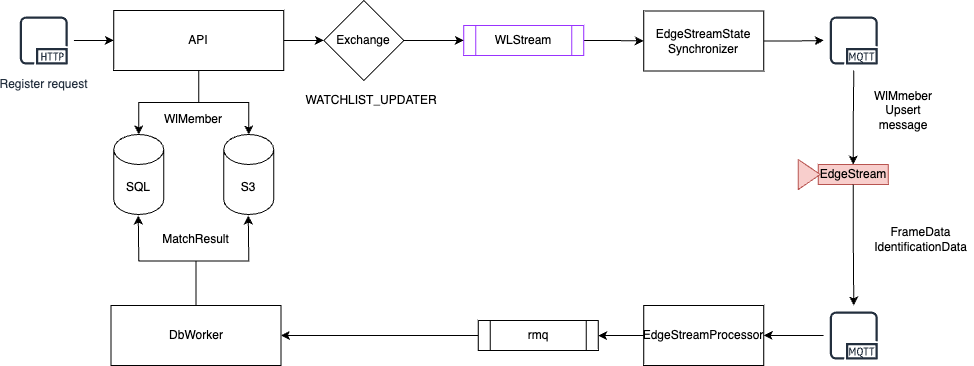
Enable synchronization
-
edge-streams-state-synchronizeris part of the Face Matcher Compose file and starts with the stack; check it is running withdocker compose ps. -
Build the update-log stream from the current database. Stop the platform services, run the packaged script, then start again:
docker compose down./populate-wl-update-log-stream.shdocker compose up -dThe script runs the admin image against the dependencies (which stay up) with the connection values from
.env. -
Turn synchronization on per edge stream. In Station open the edge stream's settings and enable the Watchlists for matching and synchronisation section, choosing all watchlists or specific ones, see Edge Streams. Through the API call
PUT /api/v1/EdgeStreams/{id}/WatchlistSynchronizationwithwatchlistSyncOptionset toNone(off, already synchronized data stays on the device),All, orSelectedtogether with awatchlistIdsarray of existing watchlist IDs.
Matching and liveness strategies
Once the device identifies locally, decide whose result counts. The matching data strategy of an edge stream is either EdgeStreamOnly, where Face Matcher trusts the device's identification and only fetches the member's business data (display name, watchlist) for notifications, dropping the result if that lookup fails or if the score is below the watchlist threshold and keeping the best candidate when the device returns several, or ServerOnly, where the device's identification is ignored and the server matches the template itself. The liveness data strategy works the same way: EdgeStreamOnly uses the liveness computed on the device for the liveness types configured on the stream (a missing result counts as "not performed", and the device's own condition evaluation applies), while ServerOnly re-runs liveness on the server and requires the device to send a face crop with a face area of at least 5. If the device sends no template, the server extracts one, so templates are always available downstream. See Liveness.
Maintenance
The update-log stream only grows. Compact it from time to time by re-running ./populate-wl-update-log-stream.sh with the platform services stopped as above; the script writes a fresh generation of the stream from the database and deletes the old one, and the devices resynchronize from it. Run it also after restoring a database backup (Backup and Restore) and whenever the release notes of an upgrade ask for it.