Authentication
Face Matcher ships with authentication off: anyone who can reach the ports can call the REST and GraphQL APIs and open Station. Before a deployment leaves the lab, protect both layers with OAuth 2.0 / OpenID Connect (OIDC) tokens issued by an identity provider you already run, such as Keycloak or Auth0. Setting up the identity provider itself is outside this page. Tokens travel in HTTP headers, so put the APIs behind HTTPS (a reverse proxy) and enable HTTPS for Station first. Everything here applies to the Docker Compose deployment.
Protect the APIs
The api and graphql-api services (and the Leader in a Leader and Follower setup) read these keys from .env section 3.3. Once enabled, every request must carry Authorization: Bearer <access token> issued by the configured authority; requests without a valid token get 401.
| Key | Meaning |
|---|---|
Authentication__UseAuthentication | true to require tokens. |
Authentication__Authority | Issuer URL of the identity provider, used to discover signing keys and validate tokens. Keycloak: https://keycloak.example.com/realms/<realm>; Auth0: https://<tenant>.auth0.com/. |
Authentication__Audience | Expected aud claim; required by Auth0 (the API identifier), optional elsewhere. Prevents a token minted for another service being accepted. |
Authentication__IgnoreHttpsIssuerCheck | true allows an http:// authority, for test systems only. |
Authentication__SwaggerAuthConfig__ClientCredsTokenUrl | Token endpoint for the client-credentials flow, used by the built-in Swagger UI. |
Authentication__SwaggerAuthConfig__AuthCodeAuthorizeUrl | Authorization endpoint for the authorization-code flow in Swagger UI. |
Authentication__SwaggerAuthConfig__AuthCodeTokenUrl | Token endpoint for the authorization-code flow in Swagger UI. |
Multitenancy__UseMultitenancy | true to scope data by tenant. |
Multitenancy__TenantClaimName | Claim carrying the tenant ID, default sf-cm-tenant-id; the identity provider must add it to tokens. |
With Keycloak the Swagger endpoints are <authority>/protocol/openid-connect/token and <authority>/protocol/openid-connect/auth. Apply with docker compose up -d. Integrations obtain tokens from the identity provider (client-credentials for services, authorization-code for users) and pass them as described in REST API and GraphQL API.
Protect Station with Keycloak
Station has its own settings in .env.station. Prepare Keycloak first: in the realm create an OIDC client for Station with the redirect URI https://station.example.com:8000/*, create groups that map to Station roles, add users to those groups, and add a Group Membership mapper to the client that puts group names into a token claim named sf_roles.
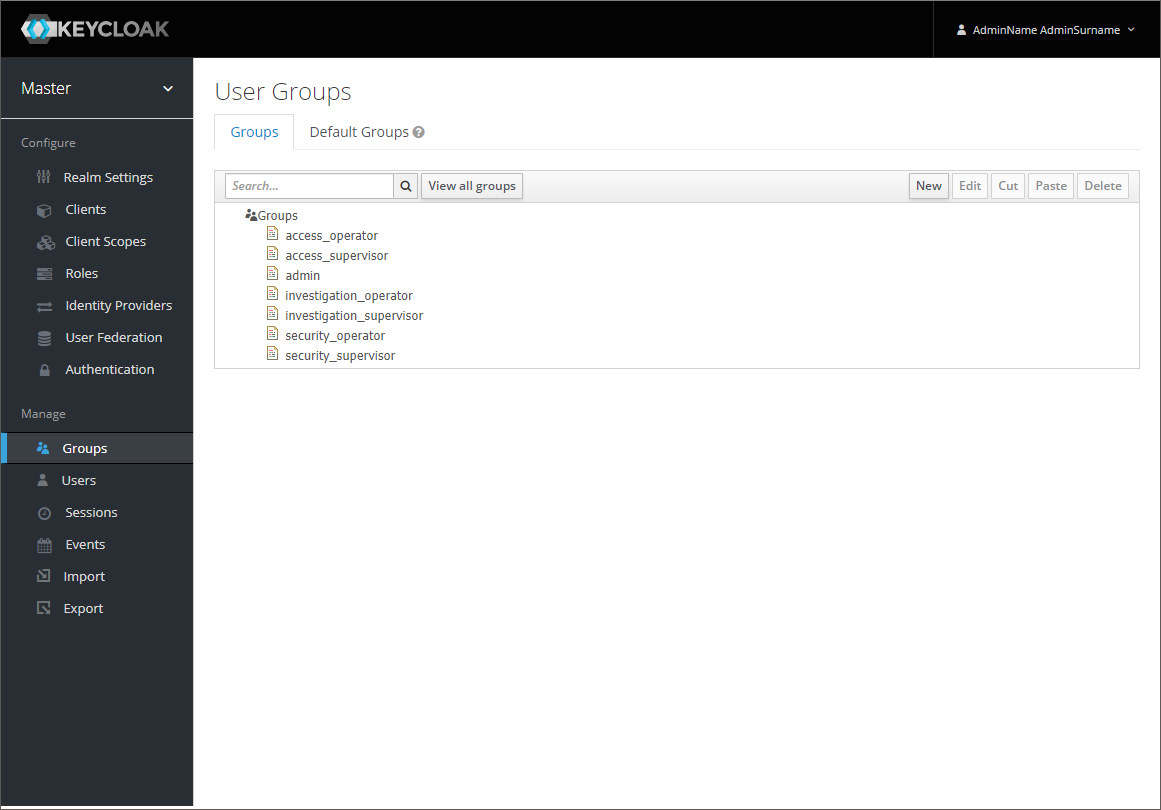
Then set:
KEYCLOAK_AUTHENTICATION_ENABLED=true
KEYCLOAK_DOMAIN=https://keycloak.example.com
KEYCLOAK_REALM=face-matcher
KEYCLOAK_CLIENT_ID=station
KEYCLOAK_JWKS_URI="https://keycloak.example.com/realms/face-matcher/protocol/openid-connect/certs"
KEYCLOAK_ADMIN_URL=https://keycloak.example.com/admin
UNAUTHORIZE_ACCESS_REDIRECTION_URL=https://keycloak.example.com/realms/face-matcher/account

ROLES_CLAIM_NAME=sf_roles
ROLE_KEY_ADMIN=/admin
ROLE_KEY_SECURITY_ADMIN=/security_admin
ROLE_KEY_SECURITY_SUPERVISOR=/security_supervisor
ROLE_KEY_SECURITY_OPERATOR=/security_operator
The ROLE_KEY_* values are the Keycloak group paths on the right that grant the Station role on the left; what each role can see is listed in Roles and Presets. Leave FORCED_ROLE_NAME_0 commented out, otherwise every user gets that role regardless of groups. KEYCLOAK_ADMIN_URL only adds a link to user management in Station's configuration page. Apply with docker compose up -d station; opening Station now redirects to the Keycloak login, and the log-out button appears at the bottom of Station's menu.
Protect Station with Auth0
The alternative block in .env.station targets Auth0; take the values from the Auth0 application you create for Station and use the same ROLES_CLAIM_NAME / ROLE_KEY_* mapping with a rule or action that adds the user's groups to the token:
AUTH0_AUTHENTICATION_ENABLED=true
AUTH0_DOMAIN="<tenant>.auth0.com"
AUTH0_CLIENT_ID="<client id>"
AUTH0_AUDIENCE="https://face-matcher.example.com/api"
AUTH0_ISSUER="https://<tenant>.auth0.com/"
AUTH0_JWKS_URI="https://<tenant>.auth0.com/.well-known/jwks.json"
Enable only one of the two providers at a time.
Close the public ports
Authentication on the APIs is only meaningful if the unauthenticated dependencies are not reachable. The package publishes every port on all host interfaces with default credentials (Network and Ports). Station talks to the platform inside the Compose network (api:8080, graphql-api:8080), so on a hardened host:
- restrict
8098(REST) and8097(GraphQL) at the firewall to the reverse proxy or the integration hosts, or unpublish them by overridingportsforapiandgraphql-apiindocker-compose.override.yml; - block
5432,15672,5672,1883,5552,8333and7070from anything but the host itself, and change the default RabbitMQ, S3 and pgAdmin credentials in.env,.env.stationanddependencies/docker-compose.yml; - allow only the Keycloak or Auth0 endpoints between the Face Matcher host and the identity provider, and change Keycloak's default administrator password.
Verify
curl -i http://localhost:8098/api/v1/Watchlists must return 401 without a token and 200 with a valid bearer token. Opening Station in a private browser window must land on the identity provider's login page, and a user in the /security_operator group must see only the operator pages.