

Workflow and Courses
Integration workflow
Integrators are free to design their own integration workflow when using Innovatrics components. However, the following workflow represents the recommended approach.
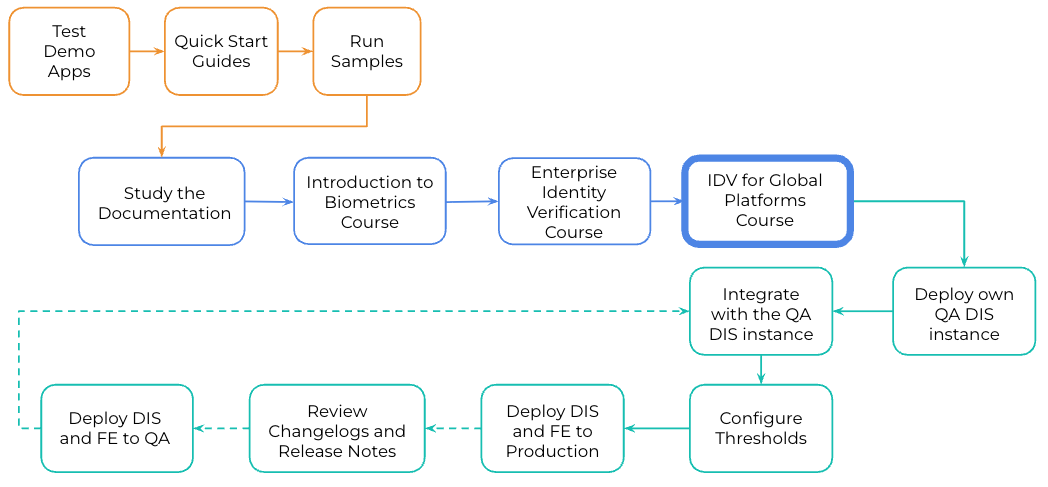
- Test Demo Applications
Integration typically begins by exploring the demo applications. These provide an immediate hands-on experience with the available features and allow quick testing without any programming effort. Demo apps are available for Android, iOS, and Web.
- Quick Start Guides
For fast, code-free testing of onboarding flows, the Postman Quick Start can be used. It enables execution of various onboarding scenarios against the Innovatrics testing server with minimal setup.
- Run Samples
Innovatrics provides a variety of sample projects for different platforms and technologies. These samples demonstrate individual features in isolation, help observe API behavior, and clarify integration points.
- Study the Documentation
Comprehensive technical, feature, and business process documentation is available online. This material offers detailed information about system architecture, configuration options, and features. Extensive API documentation is also provided to describe integration endpoints and configuration possibilities.
A free Guide to Biometrics by Innovatrics Course is available to support understanding of biometric fundamentals. Completing this course helps clarify standard biometric practices prior to starting integration.
This course introduces the core principles and concepts of enterprise-grade identity verification. It explains how identity verification works, why it is critical for security and compliance, and outlines the key components, processes, and technologies used to verify identities in modern digital and enterprise environments.
This course is designed to help you understand how Identity Verification is implemented and scaled for global platforms. It introduces the key IDV modules and explains how they work together, covering IDV workflows, best practices, and architecture and deployment considerations to ensure secure, compliant, and efficient identity verification across different regions and use cases.
- Deploy own QA DIS Instance
After initial testing against the public testing server and taking courses to understand the fundamentals, the next step is deploying a dedicated DIS (Digital Identity Service) instance. This enables larger-scale, environment-specific testing.
- Integrate With the QA DIS Instance
With a QA instance running, integration of SDK components and DIS can take place. At this stage, all edge cases, exceptional flows, and potential error scenarios should be thoroughly validated.
- Configure Thresholds
Once integration is complete, thresholds should be configured and fine-tuned based on testing results. Although thresholds can be adjusted after launch, establishing solid initial values helps maintain security levels and ensures a smooth user experience.
- Deploy DIS and Frontend to Production
When the solution has been fully tested and configured, the DIS and frontend components can be deployed to production. System behavior should be monitored closely, and any required corrective actions taken. Threshold adjustments should only be performed after collecting sufficient operational data.
- Review Changelogs and Release Notes
IDV components receive regular updates. Systems should therefore be designed to support routine component updates. Using recent component versions ensures access to the latest accuracy, security, and performance improvements.
- Deploy DIS and Frontend to QA Prior to Upgrades
Upgrades may introduce changes to APIs or internal behavior. For this reason, updates should always be tested in a separate QA environment before being applied to production. The upgrade cycle typically includes integration testing, threshold tuning, and final deployment.
Online Courses
Innovatrics offers a range of free online courses through its learning platform, empowering users to deepen their knowledge of biometric technologies and digital onboarding. By visiting our learn portal, anyone can access high-quality, self-paced trainings designed by Innovatrics experts to help professionals grow their skills and stay up to date with the latest industry practices.