

Active Liveness Detection
The Active liveness detection is a method of Presentation attack detection (PAD) determining whether the presented face is a real person, by requiring the user perform a challenge.
This check is recommended for applications where the security is paramount or where legislation obliges the user to respond to a challenge.
Innovatrics IDV Toolkit provides these types of active liveness:
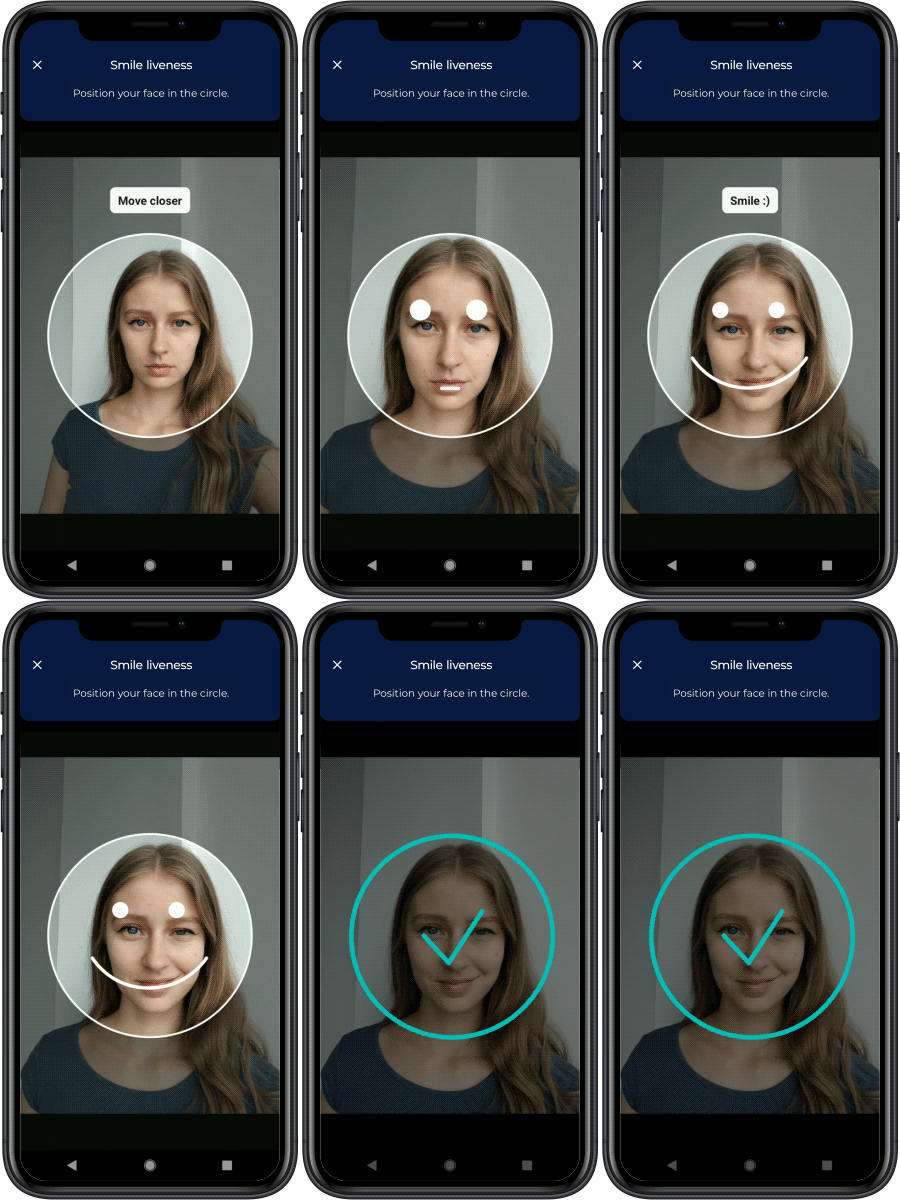
- Smile liveness - challenges the user to smile
- Multi-Range liveness - challenges the user to take selfies at various ranges from the camera
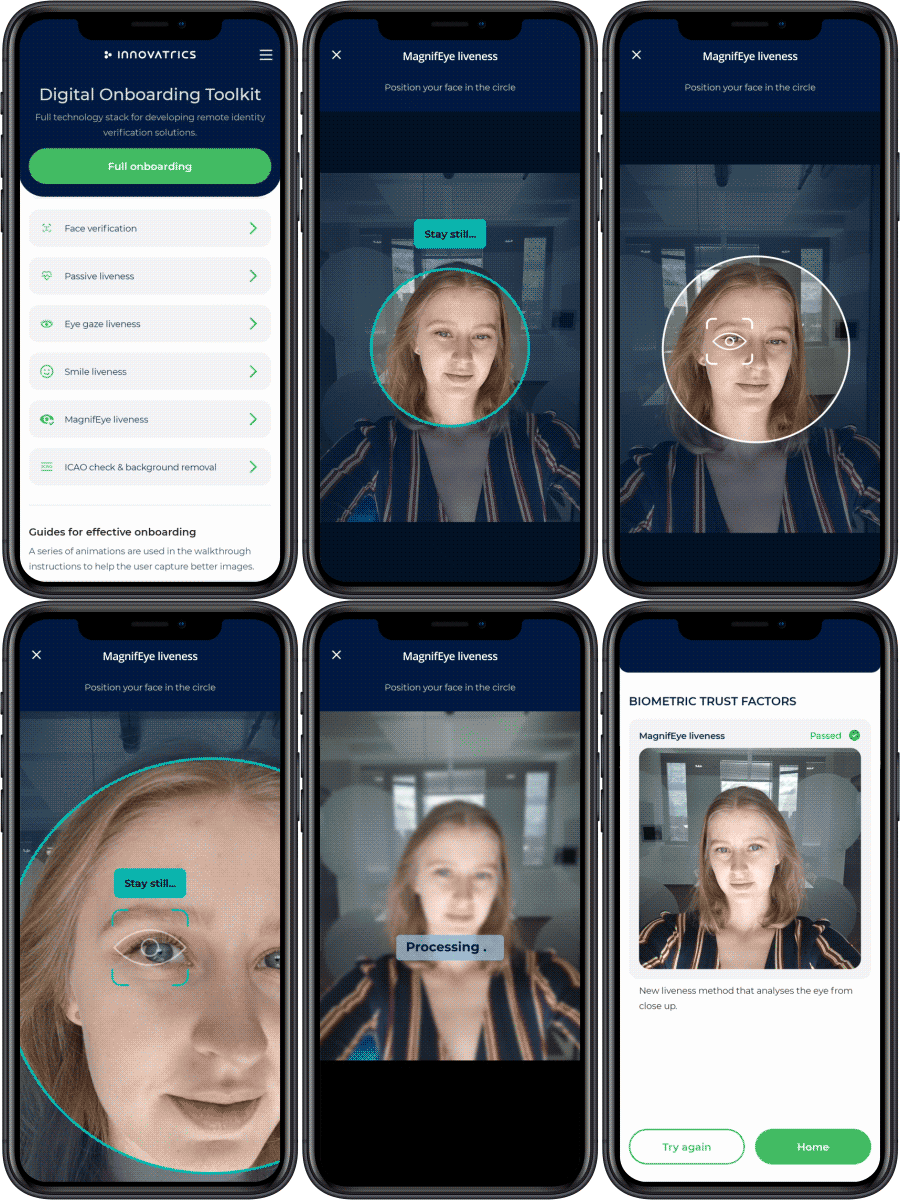
- MagnifEye liveness (deprecated) - challenges the user to focus camera on his eye
- Eye-gaze liveness (deprecated) - challenges the user to follow a dot on the screen with their eyes
The Smile liveness is a semi-passive method of liveness and provides excellent user experience with a positive emotion and fast time to capture. The Multi-Range liveness provides higher level of security with a randomness factor that might be required by legislation.
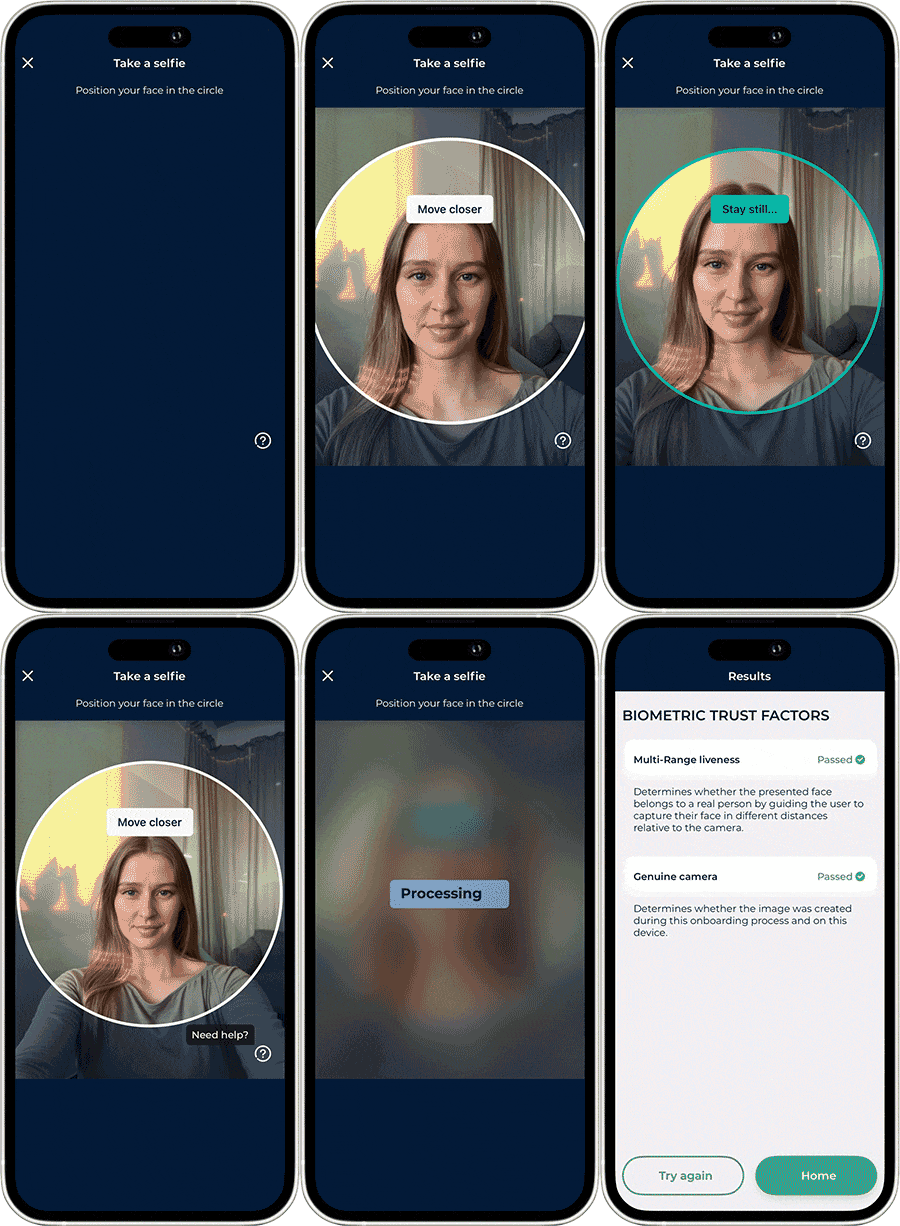
Digital Identity Service provides the server-side liveness detection with the Liveness functionality.
Smile liveness
The Smile liveness collects the selfie of a person with different face expressions. It guides the user to position his face properly, and then to change the face expression. The client component collects multiple photos and puts them into a proprietary file format for safe transfer to the server. This allows also the Video Injection Detection to be evaluated.
The threshold for Smile liveness has to be set up in the same way as for Passive Liveness.
Multi-Range liveness
The Multi-Range liveness asks the user to capture multiple selfies. Before the client capture component is used, it is necessary to initiate the client-server session by generating the challenge on the server. The component also puts multiple images into a proprietary file format for the Video Injection Detection.
The threshold for Multi-Range liveness has to be set up in the same way as for Passive Liveness too.
MagnifEye liveness (Deprecated)
The MagnifEye liveness is a UI component that collects one selfie of the person and then guides to take a closeup photo of the person’s eye. The component returns a selfie, so there is no need to run a face auto capture separately.
The additional photo data are returned in a proprietary binary format, which needs to be transferred to Digital Identity Server for evaluation. This liveness cannot be evaluated on client side.
The MagnifEye liveness UI component is available for all client technologies. It is supported by mobile libraries Android Face, Android Face Lite, iOS Face and iOS Face Lite. For web development, there is a dedicated component Dot Web MagnifEye Liveness.
MagnifEye liveness thresholds
The final decision if the face is real or a spoof is determined by the active liveness score and the threshold. If the score is above the threshold this can be interpreted as accepted, while if the score is below the threshold it is rejected. Please, read the Passive liveness page for explanation of the scores and thresholds.
MagnifEye liveness threshold for versions DIS 1.43 and above (updated 2024-06 dataset)
| Use case type | Threshold | Performance |
|---|---|---|
| Convenience (minimum rejected attempts) | 0.803 | 2.8% APCER @ 1% BPCER |
| Balanced (equal error rate) | 0.829 | 1.8% both APCER & BPCER |
| Security (minimum accepted frauds) | 0.858 | 3.7% BPCER @ 1% APCER |
In the version DIS 1.43, we recommend following threshold:
- 0.83 Optimized for security
MagnifEye liveness threshold for versions from DIS 1.19 till 1.42
| APCER levels | APCER [%] | BPCER [%] | Score threshold |
|---|---|---|---|
| 1:50 | 2 | 0.6 | 0.872 |
| 1:100 | 1.1 | 0.9 | 0.875 |
| 1:1000 | 0.01 | 1.3 | 0.880 |
In the version DIS 1.19, we recommend following threshold:
- 0.88 Optimized for security
Eye-gaze liveness (Deprecated)
This method of active liveness is advised to be replaced by one of Smile or MagnifEye liveness as these provide far better user experience.
The Eye-gaze liveness is a UI component that collects the required data and calculates the active liveness score. It displays instructions to the user, and requires appropriate positioning. An object is displayed on the screen, and when it starts moving the user must follow this movement with their eyes. This process is completed when a sufficient number of frames have been collected, and a liveness score can be evaluated. It is terminated when face tracking has been lost and must be restarted.
The Eye-gaze liveness UI component is currently available only in Android Face and iOS Face libraries in version 3.0.0 and later.
Eye-gaze liveness threshold
The final decision if the face is real or a spoof is determined by the active liveness score and the threshold. If the score is above the threshold this can be interpreted as accepted, while if the score is below the threshold it is rejected.
| APCER levels | APCER [%] | BPCER [%] | Score threshold |
|---|---|---|---|
| 1:10 | 10 | 5.6 | 0.9671 |
| 1:20 | 5 | 8.3 | 0.9985 |
| 1:50 | 2 | 10.2 | 0.9994 |
| 1:100 | 1 | 17.6 | 0.9999 |
| eer | 7.955 | 8.3 | 0.9900 |
Maximum security is reached when the threshold at APCER 1:100 is selected (0.9999).